
New KrafterPRO Update!
4.2.11 — 2026-09-06
In short: This release adds ready-made instructions and commands that make Divi AI build with your design system instead of one-off styling, plus a one-click cleanup pass for pages Divi AI has already built. Design Assist also catches more problems, and a few rough edges are fixed.
New
- Divi AI instructions, built for you. KrafterPRO → AI tab now gives you two things to hand to Divi AI: an Always-On rule you paste once so every Divi AI build sticks to your kit's tokens, colours and presets, and a set of copy-paste commands for common jobs (audit a page, swap hardcoded values for variables, merge repeated styles into presets, fix contrast, tidy headings). If your kit is missing a piece, the text says so plainly rather than inventing a name.
- One-click cleanup for Divi AI pages. Design Assist can now run a single "Apply KrafterPRO design system" pass over a whole page that Divi AI built — it corrects any made-up preset names and strips the per-element styling that your presets already handle.
- Design Assist catches more. It now flags headings or body text that aren't on a type preset, and hardcoded spacing on rows, columns and groups — not just on sections.
Changed
- The per-build command is now step-by-step. The command you paste at the start of a Divi AI build reads as clear numbered instructions with a "done" checklist: build the layout first, then apply your presets in the same step. It still pulls the preset names from your live kit.
- Frames insert is more forgiving. Inserting a Frame no longer fails outright when one preset it references doesn't exist on the destination site. It inserts anyway, as long as the tokens and colours resolve.
Fixed
- Type presets stop touching the font. Presets like
k-h1andk-text-bodyset size, weight and line height only. The font family comes from your kit and is left alone. - Better guidance to Divi AI on colour and contrast. The Always-On rule and build command now tell Divi AI to keep colour paired with text styles, use the light-on-dark colour roles on dark or primary sections, and meet WCAG AA contrast.

Mak . Can you explain why with v4.2.10 I had my site saying it was at 100%. After installing 4.2.11, all of a sudden, without any other changes, it's saying I'm at 58? That's a huge difference. Can you explain?? Was this because of changes you made to KrafterPro or what might have caused this??

Gary Gordon I added more things to scan in this version thats why.
Mak . See the screenshot for an additional issue.
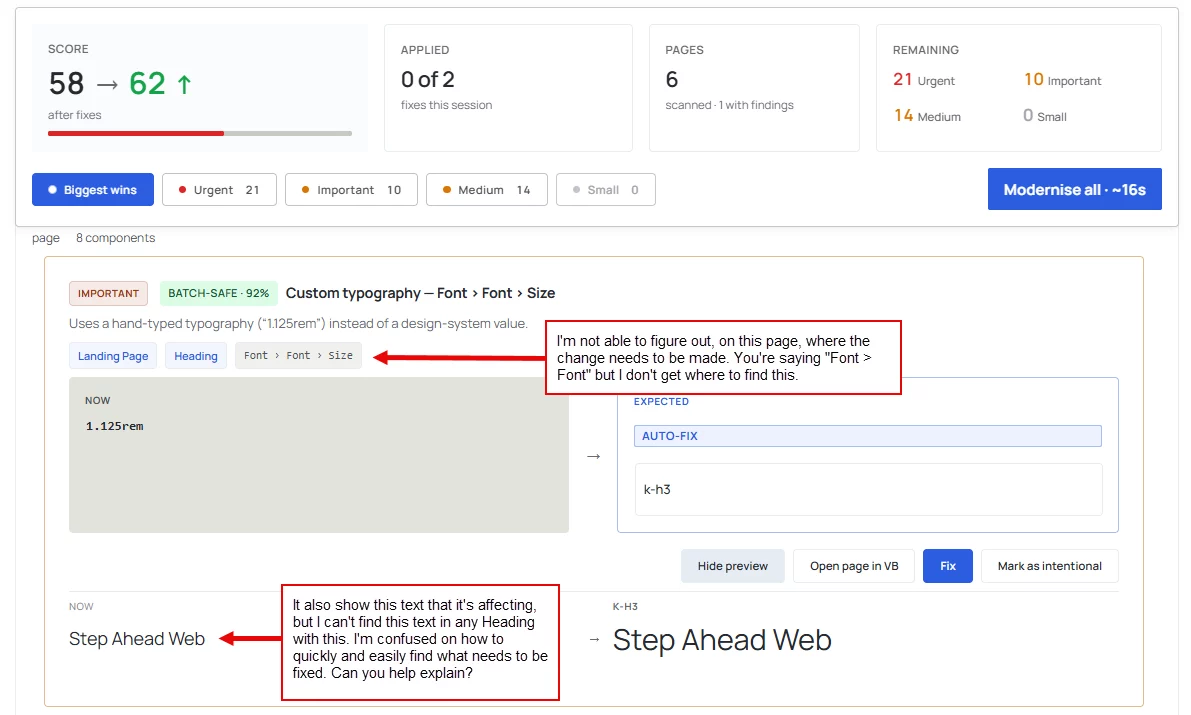
I'm not able to easily figure out WHERE to look to fix items that are identified by KrafterPro. Is there any way you can help explain how we're supposed to use this information so we can get right to the item(s) that need to be fixed?

Gary Gordon KrafterPRO seems to point to wrong places (mismatch)
I am going to do a video tomorrow.
Mak . Great!!