

I'd love to have a conversion tool from an AI prototype (for example Claude Code or Antigravity + Skills or MCPs for Figma, Stitch or other) to Divi5 Layouts to speed up the design process.
I've seen a few projects on this topic, Skills for Claude Code, a Plugin for Figma. I haven't tried them yet, I just started learning Claude Code with almost no coding skills.
My wish?
It would be awesome if a future version of KrafterPro could import a AI generated Divi 5 layout and apply the design system to that layout: i.e. presets and variables, changing fixed scaling to fluid typography and spacing, applying the defined color system, etc.
The goal: going from a prototype in HTML to a final design in Divi 5 in minutes/hours instead of days of building the pages manually in Divi.
Personally I'd pay for that.
Is there a market fo that? https://respira.love/ and https://softlite.io/clonewebx/ are proof of that.
Is that the next step for ET's Divi AI? Or maybe Mak will accept the challenge?
I'd love to read your thoughts.

Hi Mak,
I'm loving Divi 5 and they way it encourages us to start the design process in a more professional way. The tools, courses and advice that you're providing are absolutely superb, and I've been making the most of these on my new website projects.
However, I have a considerable portfolio of Divi 4 websites and I would very much appreciate you suggestions on best practice for migrating these sites from Divi 4 to Divi 5. Wherever possible, I'm trying to incorporate variables, presets, etc. but I feel what I'm doing is a bit hit and miss. I would love to follow a comprehensive methodology for this process. Is this something you might consider creating.

I am adding some Divi Pixel flip box cards to my website. Unfortunately, Krafter presets are not available on this plugin module, and I have become spoiled by having them available everywhere. Is there a way to make Krafter presets to work in a situation such as this?

Designers are using Divi 5 with the Divi 4 workflow and that is WRONG!
Designer open Divi 5 and start building, picking fonts that feel right, choosing colors that look okay, tweaking spacing until it "works." And every site ends up looking inconsistent, taking forever to finish, and impossible to update without breaking something.
It's not a skill problem. It's a system problem.
This course gives you the exact workflow professional Divi 5 designers use to build websites that look great, stay consistent, and scale across every project you take on.
You'll learn how to:
-
Define your design variables — the foundational decisions (typography, color, spacing) that make every site feel intentional, not accidental
-
Map those variables to Divi 5's global system — so every change you make updates everywhere, automatically
-
Create global presets — so you're never starting from scratch again
Build module presets — the reusable building blocks that let you build faster on every new project
*** This course will be FREE for Lifetime Members 😅

You know that thrill you get when you know a site you visit every day is about to be updated? As users, we often don't think about it, but behind it all is a creator who trembles at the thought of "destroying everything" with a single click.
I just saw the behind-the-scenes footage of our platform's update to FluentCRM 3.0, and it was incredible. Seeing the "engine" that manages our communications and courses update in real time made me reflect on two fundamental things:
The value of relationships: This tool isn't just for sending cold emails; it's the sincere bridge with which the creator cultivates our community. Knowing that there are now super-precise visual automations and even integrated Artificial Intelligence means we'll receive increasingly tailored content.
Digital democracy: Hearing how the platform has gone from astronomical costs ($115/month) to incredibly optimized solutions (about $5/month) without losing a shred of quality (in fact, gaining speed and detailed reporting!) is proof that doing business online intelligently is possible for everyone today.
As a subscriber, seeing this transparency—complete with honest critiques of the interface's small visual flaws—makes me feel even more part of a real project. Technology, when done well, fades into oblivion and leaves room for what matters: us.
And you, as users, do you ever notice how much work (and how much frustration!) goes into the buttons we click every day?
I will adopt this marketing communications system as soon as I'm able to manage my own reader-oriented communications platform. Thanks, Mak, for providing us with such a valuable resource.

Hi All
I need a bit of help as I am not sure whats happened here.
I'm no coder or builder so bear with.
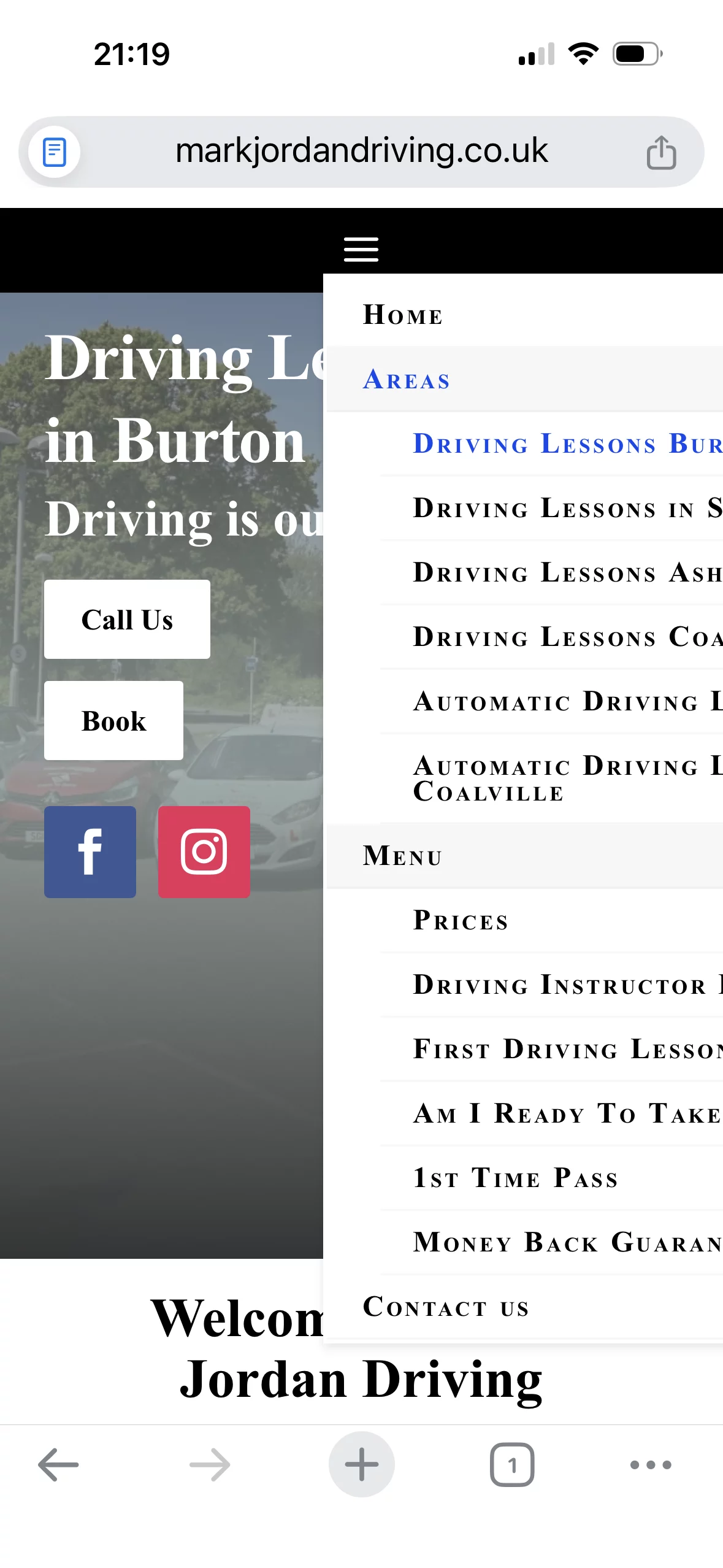
I done a Divi 5 update today and my menu headings there are only 4 were in the center at the top, after the update they went all the way over to the left, so I realigned back to the centre but the mobile dropdown is out of line. Pic attached.
Not sure why after the update the menu went left but I would like it in the centre along with the mobile dropdown in the centre.
I have moved everything back to the left for now.
Thank you.

With the new DIVI 5 & constant improvements plus MAK's Krafter Pro I have been updating my old DIVI 4 websites. Still learning the System but this is what I have thus far...
I'm about to embark on building my personal and professional communications platform. For this reason, I'm looking at Divi 5 not just as a page builder, but as a strategic environment in which to build identity, content, reader paths, newsletters, author pages, landing pages, and, more generally, a coherent digital ecosystem.
From this perspective, the comparison between Divi 5 Native and KrafterPRO is very interesting, as it highlights a fundamental distinction: Divi 5 offers a comprehensive design workshop; KrafterPRO seems to add a working method, structure, and a concrete acceleration of work.
Divi 5 has made a significant leap with fluid design tokens, adaptive typography, responsive spacing, and more modern layout management. This is progress to be recognized. However, those working with professional goals know well that having the tools doesn't automatically mean having a system. The risk, especially in complex projects, is getting lost in micromanagement: colors that aren't always consistent, modules that need redesigning, pages that need building one by one, margins that need adjusting, presets that need recreating, and missing or improvised final documentation.
This is where KrafterPRO seems to offer its strongest contribution: transforming Divi 5 from a construction environment to an organized production system.
The most obvious advantages, in my opinion, are three.
The first is the consistency of the design system. The presence of semantic tokens, color scales, pre-organized presets, dark/light mode management, and ready-made modules allows you to work not only faster, but above all with greater control. For those building a publishing, authoring, or corporate platform, visual consistency isn't just an aesthetic detail: it's part of credibility.
The second advantage is the professional speed of execution. Features like Auto Grid, complete starter sites, production-ready presets, and imports managed with more secure logic reduce the time spent on repetitive tasks. This allows professionals to focus on what really matters: content architecture, user experience, messaging, conversion, and audience engagement.
The third point, perhaps the most interesting for freelancers and agencies, concerns client management. The ability to generate handoff documents and style guides elevates the project to a more mature level. You don't simply deliver "a website," but a comprehensible, documented, and maintainable system. This elevates the perception of the work done and can justify a higher professional positioning.
I would also like to add a constructive consideration.
One of the most common scenarios for freelancers and agencies is receiving existing websites, often messy, cumbersome, inconsistent, or built without a true design logic. In these cases, the value lies not only in creating a new site from scratch, but in redeveloping an "ugly duckling" site and transforming it into a "white swan."
It would be very interesting if KrafterPRO further enhanced this type of workflow: not just starter sites for new projects, but also tools or procedures dedicated to the guided renovation of existing sites.
For example, I imagine a method designed for agencies and freelancers that allows them to:
- analyze an existing Divi site;
- identify inconsistencies in colors, fonts, presets, spacing, and modules;
- propose a new visual structure based on the KrafterPRO design system;
- generate a relaunch prototype to present to the client;
- demonstrate a realistic transformation scenario before the final work.
This would be very useful in sales negotiations. The professional could show the client not just a quote, but a vision: "Here's what your site could look like if we brought it into a coherent system." It would be a form of project preview, capable of making the proposal more concrete and the client's decision easier.
In short, my impression is that KrafterPRO shouldn't be seen as a simple preset package or a decorative addition to Divi 5. Its value seems to lie in its ability to introduce method, order, speed, documentation, and operational continuity.
Divi 5 provides the building power. KrafterPRO seems to offer a direction.
For those, like me, who are about to build a digital platform with professional goals, this difference is important: I'm not just looking for beautiful tools, but a system that allows me to work with consistency, speed, and vision.
The real promise, in my opinion, is this: less time wasted on maintaining chaos, more energy dedicated to project quality, communication, and relationships with the public or client.
I conclude with this intention: Divi 5 puts a large workshop in the hands of the designer. KrafterPRO seems to transform that workshop into an organized construction site, with a project, materials, procedures, and final delivery.
I truly hope that Mak will give me the joy and fulfillment of building a professional web communication platform, one that will finally allow me, as an author and writer, to express myself with complete independence, shaping and managing my digital presence in a way that feels authentic and deeply mine. With all my heart, I wish each of you the very best in the success of your projects. I am profoundly convinced that KrafterPro has that rare power to transform an idea into a path, a desire into an achievement, a dream into something real.

I figured I'd share this website that I built for my mushroom farm. It's still a work in progress. I've been using KrafterPRO. I'm new to building websites. Mostly just interested in building websites for my own businesses, but you never know what that may turn into once I get the hang of it.
In this video, I’ll show you how to get started with KrafterPro, a logic-driven design system and workflow tool built for Divi 5.
You’ll learn how to download KrafterPro, install the plugin, activate your license, import your design system, use safe merge or override mode, export backups, reset variables and presets, and start designing faster with ready-made presets and workflows.
KrafterPro helps you build Divi 5 websites that are easier to maintain, more consistent, and much faster to manage especially if you’re building client websites or working with a team.