

- KrafterPRO Solo - 3 Licenses - $97 yearly
- KrafterPRO Freelancer - 25 Licenses - $197 yearly
- KrafterPRO Agency - Unlimited Licenses - $297 yearly
- KrafterPRO LIFETIME - Unlimited - $497 One-time
Upgrade here https://diviuniversity.com/product/krafterpro/

I want to create a header that has the name of my company spelled out, but on scroll it transitions to just the initials of my company. I originally accomplished something similar with CSS, but the code was lost during a site crash. Ideas?
KrafterPRO started as a Divi 5 design system.
But it is quickly becoming something much bigger: the foundation for building professional Divi websites with AI.
With KrafterPRO 4.0, you’ll be able to:
✅ Generate and apply complete brand systems
✅ Audit an entire Divi website for design inconsistencies
✅ Replace hard-coded values with the correct variables and presets
✅ Give AI access to your colours, typography, spacing and design rules
✅ Use AI to improve existing layouts without rebuilding them manually
This is important because AI can generate a website—but without a proper design system governing it, the result can quickly become inconsistent and difficult to maintain.
KrafterPRO gives AI the rules it needs to work professionally.
I’ve recorded a private video for the community showing you where KrafterPRO is heading and how this new workflow works.
I also want to give you fair warning:
KrafterPRO pricing will increase on Thursday, 6 August.
A huge amount of development has gone into KrafterPRO 4.0, and the cost of continuing to build, maintain and support these new features has increased.
So, if you’ve been considering getting a licence, this is the best time to do it.
You can secure your licence at the current price before the increase:
This offer has not yet been announced publicly. I’m sharing it with the Divi University community first because I want existing members to have the opportunity to lock in the lower price.
Once the price increases on Thursday, the current pricing will no longer be available.
— Mak
What do you think?

See the following screenshots.
In one place, Krafter Pro displays 3.0.10. But in another, it just displays 3.0
I was curious why both places don't indicate that Krafter Pro is at v3.0.10.
For me, I'd just like to see it display the same information, unless there's a reason for this that I'm not understanding.
Here is shows the version for the Krafter Pro Design System at v3.0.
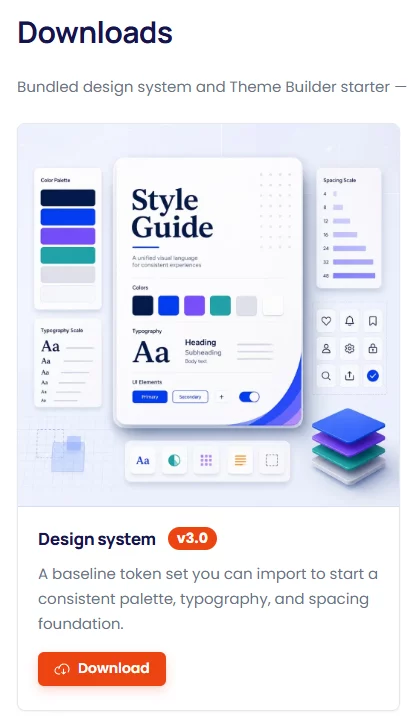
But then, at the top in Krafter Pro Dashboard it shows:
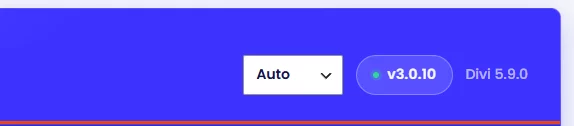
So unless there's a reason for this, my personal preference and request would be to make sure these are always displaying the same version number. This way we'll know, when downloading the Design System from the Style Guide area, that it's the version that we're expecting.
Please let me know your thoughts.
Thanks,
Gary Gordon
AI can build Divi websites... but should it? In this video I test Claude Desktop with Nova Mirror on a real Divi 5 website to see if AI can actually build usable pages. At first, the results were disappointing.
AI ignored my presets, variables and design system. Then something unexpected happened... After giving it the right context, it started using my Divi design system, semantic colors, spacing variables, button presets and even suggested improvements to my booking and payment workflow. In this video you'll see:
✅ Claude Desktop controlling Divi 5
✅ Novamira in action
✅ AI building a real landing page
✅ Why design systems matter even more with AI
✅ How KrafterPRO makes AI-generated websites consistent
✅ The future of designing websites with prompts instead of endless clicking If you're building websites with Divi 5, this is a workflow you need to see.

This is crazy but beautiful!
KrafterPRO Beta-2 Is now available, download here.
Fixed
- Divi Visual Builder settings (like the “Page” title) no longer get oversized or cut off by KrafterPRO’s fluid text sizes.
- The per-page Modernise all button works again — it applies that page’s layout upgrades, and shows an error if something fails instead of doing nothing.
- When Design Health hits 100%, the message switches to congratulations instead of staying on “almost there.”
- Hand-typed #ffffff is suggested as the white colour variable (not only
bg-default). The design system now includes white and black tokens.

Can anyone advise how to reach support if I have a problem with a download? My request is a month old with no response.

I have KrafterPRO 3.08 installed. I removed all variables and pre-sets and reinstalled from KrafterPro_Design_System_3.0.json. I changed the Primary colour to my choice but was not permitted to change the Secondary colour. Going down the list and changing bg-default to the secondary colour and then back to the secondary colour and changing it to bg-default worked but it does seem a bit odd. My heading-text colour is maroon of my choice but then all body text changed to heading text regardless of what I chose while the body colour in the style guide correctly showed a dark grey. I have rolled back for now.
Also clicking Add a Preset under Text shows text of the wrong colour but only allows editing the background.
Am I doing something wrong or should I use the system to create all my own colours?