

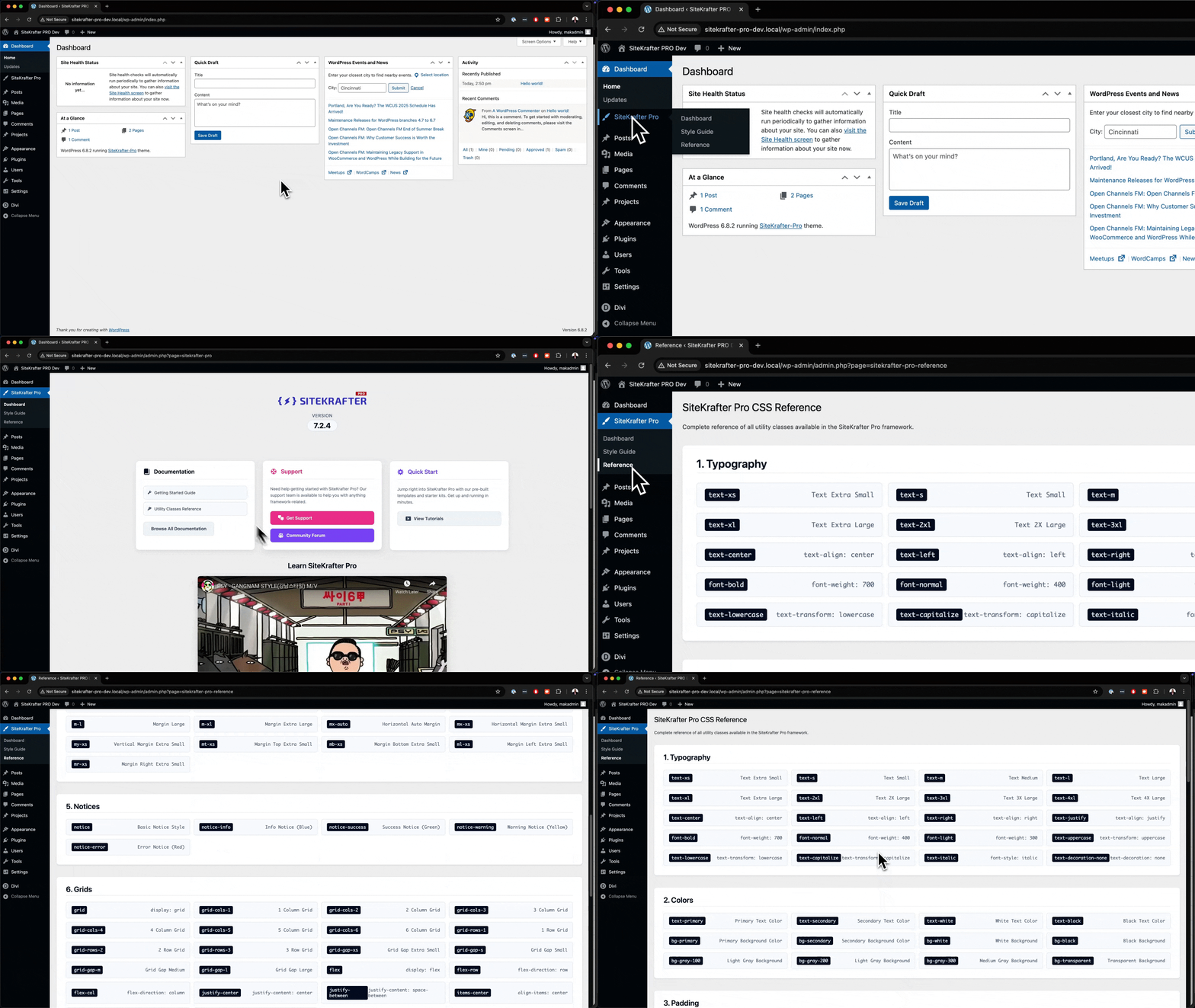
Hi! I wrote to support today and am waiting for a response to my problem, but in the meantime, I realized that I don't see the Sitekrafter section in my dashboard, as shown in your latest update video. The child theme is activated in the appearance section, but as I said, I can't see the Sitekrafter section. That's probably why I can't see the gray SK symbol in CSS Class either, and therefore can't create a pre-programmed CSS class, as I mentioned in my support request. Is there anything I can do to fix the problem?

If you purchased the yearly license and would like to upgrade to LIFETIME LICENSE before the price goes up [here is the link](<Sure, here is [the link to upgrade](https://sitekrafter.com/buy/upgrade-to-lifetime). Please let me know as soon as you upgrade so I can update your account.>).

Augustine Mak I would love to see the option to update sitekrafter from inside of wordpress instead of always having to download and upload the latest release every week. Is there a way to enable that?
SiteKrafter Pro Has An exciting Update 😀
Major Features Added:
- Complete SiteKrafter Pro Dashboard with modern design
- Admin menu integration with lightning bolt icon
- Style Guide page with interactive color management
- Reference page with comprehensive CSS utilities
- Copy-to-clipboard functionality and smart copy features
- Search & filter system with keyboard navigation
- Divi Builder integration and autocomplete
Enhancements:
- Modern two-column hero layout
- Real-time color picker with HSL controls
- Comprehensive typography system
- Unified 8px border radius design
- Responsive mobile-optimized interface
Changes Made:
- Video content updated from YouTube to Vimeo
- Menu structure reorganized logically
- CSS and JavaScript architecture optimized
- PHP structure cleaned and maintained
Code Cleanup:
- 60% reduction in CSS file size
- 80% reduction in JavaScript file size
- 5% reduction in PHP Dashboard class
- Removed unused AJAX handlers and methods
- Eliminated redundant CSS classes
Issues Fixed:
- Version display styling problems
- Multi-select functionality issues
- Autocomplete performance problems
- Responsive layout alignment
- Clipboard API compatibility
Technical Statistics:
- Total utility classes: 350+
- Performance improvement: Significant loading time reduction
- Code maintainability: Much cleaner and organized
- Security: Enhanced input validation
- Integration: Full Divi Builder compatibility
The reference will be in the framework. See video below.
This video addresses an issue with the setting of divi colours, specifically primary and action colors, using fluent snippets. I copy the exact color values and demonstrates how to correct them within the Divi settings. This divi quick tip helps ensure accurate color implementation.

Hi, I'm looking to make a Divi designed mega menu that loads on hover from the main menu (custom header) and I'm struggling because none of the plugins are working in 5. Augustine Mak Do you know how I can do this without extra plugins or a ton of custom CSS?
If your goal is to enhance your design workflow with Divi 5, the SiteKrafter PRO Framework focuses on:
- Speed — reduce repetitive tasks
- Clarity — make styling predictable and easy to find
- Consistency — enforce a coherent design system
- Flexibility — allow easy customization without breaking layouts
Get Your Lifetime License here
SiteKrafter Pro - Changelog
Version 7.2.0 - Section Padding & Enhanced Spacing Release
New Features
Enhanced Section Padding System
- Added comprehensive section padding utilities (.section-padding-xs to .section-padding-full)
- Implemented responsive section padding with mobile-first approach
- Added top/bottom only padding options (.section-padding-top-, .section-padding-bottom-)
- Created responsive breakpoint variants (.section-padding--sm, .section-padding--lg)
- All padding uses modern clamp() functions for fluid scaling across devices
Section Padding Scale
- Extra Small: 32px - 48px (.section-padding-xs)
- Small: 48px - 80px (.section-padding-s)
- Medium: 80px - 128px (.section-padding-m)
- Large: 128px - 192px (.section-padding-l)
- Extra Large: 192px - 256px (.section-padding-xl)
- Full Screen: 256px - 384px (.section-padding-full)
Responsive Variants
- Small screens (768px+): .section-padding-*-sm with optimized spacing
- Large screens (1024px+): .section-padding-*-lg with enhanced spacing
- Mobile-first responsive design with progressive enhancement
Improvements
CSS Architecture
- Enhanced CSS custom properties with section padding variables
- Improved spacing scale for modern UI/UX design
- Better responsive design patterns using CSS clamp() functions
- Consistent design token system for spacing
Autocomplete Enhancement
- Updated autocomplete to include all new section padding classes
- Added responsive section padding variants to autocomplete system
- Maintained existing functionality while expanding class library
Responsive Design
- Mobile-First Approach: All new utilities start with mobile optimization
- Fluid Scaling: Uses clamp() for smooth scaling between breakpoints
- Progressive Enhancement: Enhanced spacing on larger screens
- Touch-Friendly: Optimized for mobile and tablet devices
🔒 Security
- Enterprise-grade security: Passed comprehensive security audit
- WordPress best practices: Proper nonce verification and capability checks
- Safe implementation: No security vulnerabilities introduced
- Input sanitization: Proper data validation and sanitization
📚 Documentation
- All new classes available in Divi autocomplete
- Comprehensive utility class system
- Consistent naming conventions
- Mobile-responsive design patterns
🚀 Performance
- Optimized CSS: Efficient selectors and minimal specificity conflicts
- Smart caching: WordPress transient-based caching for dynamic content
- File optimization: Physical CSS files for better performance
- Minimal overhead: Lightweight implementation with maximum functionality
🔄 Backwards Compatibility
- All existing classes remain functional
- No breaking changes to current implementations
- Enhanced functionality without disrupting existing code
- Maintains Divi 4 and 5 compatibility
System Requirements
- WordPress: 5.0+
- Divi: 4.0+ (fully compatible with Divi 5)
- PHP: 7.4+
- Browser Support: Modern browsers with CSS custom properties support
###
In the upcoming version, you will be be able to manage your classes easily. Watch the video below.
In this FluentCRM tutorial, I reveal a powerful marketing strategy that can work wonders for both you and your clients.
Imagine this: you create a free course to attract leads, and the moment someone signs up, they’re presented with an irresistible offer to upgrade to your paid course.
This approach is a proven winner in the marketing world—turning your lead generation into a direct path for sales.
Check out the full course here: https://diviuniversity.com/Email-Marketing-Mastery/