
Can you provide us with a complete list of all the Presets that are included in Krafter Pro?
Mak Can you provide us with a complete list of all the Presets that are included in Krafter Pro?
I'm hoping you can provide us with an excel spreadsheet, or Google sheet, etc., that would provide us with a "LIST" of all of the Presets and the Clamp Values, that (if needed) we could copy and paste (and make changes to - if needed). I often find I want to change the Clamp value that you entered for text, or a heading, or a list, or for spacing, etc. And if I could just have a complete list of all of the Clamp values, and what the values are used for, would help me find what I'm looking for (quickly) and be able to create "new" Presets or change existing presets. Do you think you could provide us with a complete list of the Presets (and Clamp values) that we could use as a reference and guide? Please let me know.
If this is already available, since I'm a plus member in the community and have purchased all of your tools, please let me know where I can find this and download it.
Thanks,
Gary
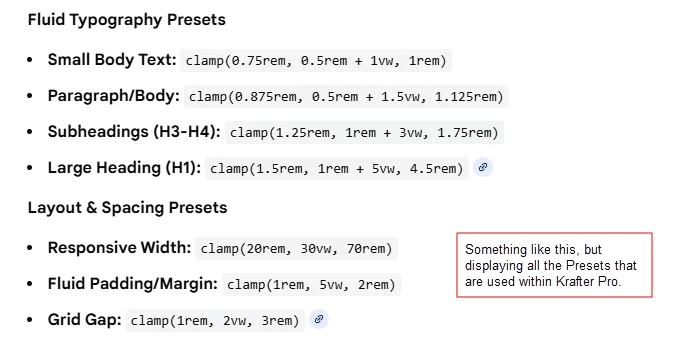

Pius Illa Thanks. But, is there any way to export all of these items into a list, that could look through (as a list in an excel file type of thing) rather than my having to copy and paste each individual item out of the "variable manager" area, so I could just get them into a comprehensive list (line by line and by category)?? Plus, in the Variable Manager, I only see Clamp values under "Numbers". And in this location, I'm not seeing all of the presets. For example, I'm not seeing any of the headings, radius, etc. That's why I'm looking for a single, comprehensive list of everything that I can review, look at and copy and paste out of if needed. Any further thoughts?

Gary Gordon
I just load the two .json to files into notepad++. I have an JSON converter as a plugin, so it make the data-desert a little bit more readable.
But the result is still frustrating:
OK, I can see the number variables for numbers and colors, fields and values.
But in the Presets it will get struggeling again: The values there depend on the values of the numbers. That means, in an preset for Header is an field for the textsize, one for the length, one for the hight etc. But in the field for the corresponding values, there are not the values itself, but the fieldnames of the number's values.
Quite clear: If a user changes the clampvalue for H5, he expects that the design will change everywhere, where H5 is set, even inside the corresponding preset.
So, even if i could bring it to Excel, it would not be useable, because of the dependencies between the data arrays.
The only thing that can be done is an "empty" Excel with the names of the fields and a blank field to note your own values. But than I can take a look at the variable manager, thats the same...
Gary Gordon
Plus: There are so many variable fields in every Divi module (even inside the presets) that this list would be 30 pages long.
Klaus Fabritz Mak That sounds good. 30 pages?? I would greatly appreciate being able to look over all of this information. It would be one .csv file. This would be a great addon resource for all of his paid customers. 🙂 Mak Do you think you could make this available to us? I understand what you said in your previous comment, but I think it would be great if Mak could create an Excel file, with all of this information, so we could use it as a refernce, so we can look and find the clamp values being used, the html code for the colors, etc., etc., etc. I hope this can be provided to us. It would be a great resource.
Gary Gordon
Next week I will have a closer look to this. Maybe I find a usable way to do this.
Klaus Fabritz Outstanding!! Thank you very much.
WE ARE FOOLS - me too!
I loaded the json file to notepad++, analyzed it with an addon (to get a better readable format), copied and pasted it to an excel file and was still struggeling on the amount of data and the dependencies between them... This has been my friday evening work :-)
The old fashioned way.
Saturday morning I had a walk with my dog in the park. And had an idea: Whats is the best tool to analyze data right now? AI !!! So, why should I do all the work manually?
So, I did export my own presets and variables (in two files) and throw them into ChatGPT: My promt is:
"Please analyze this file and make some sheets to display it. Exchange the Field IDs and the Preset IDs with the corresponding Field labels. Flatten and extract all style attributes into separate columns. Convert timestamps into readable dates"
By this, you will get an downloadable Excel file of your own values. Maybe, you want to delete some values or columns. But it's your data, and you can analyze it!
Good luck!
Klaus Fabritz Thanks. I don’t know why I didn’t think of this either. What a great thought. Thanks!!!
Gary 👍