
Cannot change basic text colour in variables
I have KrafterPRO 3.08 installed. I removed all variables and pre-sets and reinstalled from KrafterPro_Design_System_3.0.json. I changed the Primary colour to my choice but was not permitted to change the Secondary colour. Going down the list and changing bg-default to the secondary colour and then back to the secondary colour and changing it to bg-default worked but it does seem a bit odd. My heading-text colour is maroon of my choice but then all body text changed to heading text regardless of what I chose while the body colour in the style guide correctly showed a dark grey. I have rolled back for now.
Also clicking Add a Preset under Text shows text of the wrong colour but only allows editing the background.
Am I doing something wrong or should I use the system to create all my own colours?

The secondary color is chosen automatically, but you can change it. Can you show screenshots of your issues?

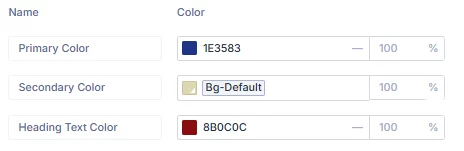
I could not edit the secondary colour but by editing Bg-default, I could select that as secondary colour. No problem typing in the value for the primary colour. This seems strange.
Murray Russell check out the video I did and see if it helps at all.
https://www.loom.com/share/cde7ad507beb41e486a083f8837b82d2
And next time, it's best to ask these kind of troubleshooting questions in the "Fix my Site" section.
Many thanks. That does the job.
I'm glad I was able to help.