
Colors not showing in the Style-Guide
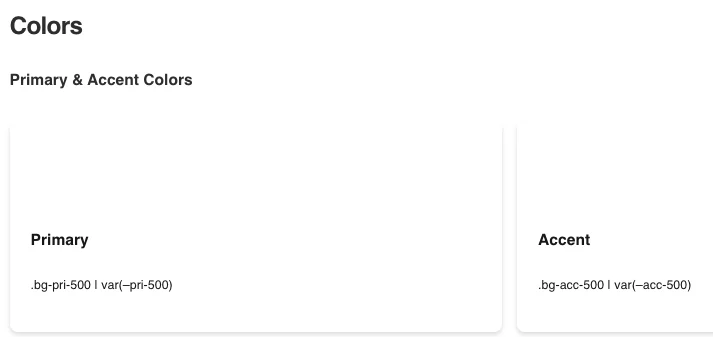
I am using Siteground as my host, had to turn off a setting to see the editor, which is fine. However, the Style-Guide is showing my font choice (after adding the Fluent Snippets), but not one color is showing before or after making any changes.
Is there some setting to change to have it show the default colors. After which I will change them, but I need to see them, first. I installed everything today, so it should be all the latest releases.

did you clear the CSS cache in Divi?

Deepak Dashairya Why, there is no need the clear cache when its a new page

I cleared the cache and even used a different browser. The gray color section works; the button displays the primary color. However, the primary, accent, and their shades do not show.
I am building a staging site (from which all future sites will be generated.) This is the site. https://douglasw40.sg-host.com/style-guide/
macobuk, I've installed all the latest releases. I went today to SiteGround and created a new temporary site. I downloaded everything today and used those versions. Once Divi 5 was installed, there was an update. I did the update and installed the SK theme, then the style guide. I got the same results as I did the other day.
macobuk Thank you. I figured as much, but it seems I have no access to the latest version. What is the process of getting the latest SK?
I went to my dashboard on https://sitekrafter.com/customer-dashboard/
It still has 6.1.6, and there is no auto-update that I see.
Again, thank you for all the work.
d
I ran into this same problem, delete the environment, and start a fresh environment.
Deepak Dashairya I did a new site today, and all the latest releases, and same results as it was on the older temp site.

I am also having this problem. When you say "fresh environment" what do you mean exactly? Like start a new styles page and trash the first one?

I haven't been able to set fonts or colors using FluentSnippets. Dougie W., how did you manage to change the fonts?
Robert Nitrio In the snippets, the first attempt did not work because I failed to place the end curly bracket. Once added, the fonts and primary color worked on the button only.
Dougie W I studied the process from Mak's video down to the last details and I am having no luck when I test a different primary font or accent color. I evem rest the heading font back to the default font in Topography, thinking that might be preventing the font variable form working. I know that closing brace can be an issue and to be honest, I missed it the first time as well. Not sure what you mean by working only on the button. Can you expand on that?
Robert Nitrio Sure. I copied the fonts and primary colors from the Divi theme editor, started a new CSS snippet in Fluent, and changed the primary font to Poppins and the primary color to a purple-looking color. I saved and activated the snippet. The new fonts show, and the button is purple. However, the guide does not display the primary or accent colors in the swatches.
Dougie W You wouldn't think that the colors would disappear like that in the Style Guide. I have been testing this by using my localhost dev platform. I am going to spin up a fresh copy of WordPress and try again to see if I can conquer the issue or alternatively confirm the definition of insanity. 😜
Dougie W I started from scratch and the edits I have been testing in Fluent Snippets seem to be working for both fonts and colors. I suspect that because I was using a reset tool called Advanced WP Reset in the previous site to restore the site if a test was not satisfactory, there may have been "leftovers" that caused my issues.
I also observed that when I added the style guide page before I installed the framework reference page, I also had no colors on the style guide page. As soon as I added the framework reference page, all of the colors appeared on the style guide page. Not sure if that helps, but it was an interesting observation.
Robert Nitrio That's good news. I'm unable to obtain the reference page. The video training course informs me that I don't have access. The dashboard doesn't reference it (yet), but it does have the style guide, which I've downloaded and installed. Once I figure out how to get the reference JSON, I'll install it. Hopefully, that'll help.
The Style guide JSON is referencing Divi 5.0.0-public-alpha.18.1 and I am running 5.0.0-public-alpha.18.2, could this be an issue?
Also try publishing the page first. then making the changes in the snippets.
Deepak Dashairya Thank you. That did not make a difference for me.
shiite. if you're up in the next hour. let's hop on a video call.
Deepak Dashairya, I can do that. It's 7:30 in Los Angeles here. The temperature has cooled (now under 90), so now I'm out walking the dog.
I am available now. If you want to share a connection (chat). I am ready.
I am reviewing the style guide CSS and believe there is an error. If I change on the page "swatch bg-pri-500" to "bg-primary", it appears. However, I do not see "bg-pr-xxx" in the SK CSS file. I am not familiar with CSS, so I may be wrong.
Someone mentioned earlier that adding the reference file solved the issue. Could I please obtain that JSON file? Although I don't see the connection to my error, I would like to have the file. The training video link is broken, and it tells me I don't have access.
sorry, still on a call.
give me about 20 min?
Text me at 2484948450
Deepak Dashairya Thank you. I'm going to pass. I think I know the issue and will test a solution.
what is the issue?
Deepak Dashairya The Style Sheet is missing the CSS descriptors.

Hi all - I have the same issue with the latest update "DIVI Version: 5.0.0-public-alpha.18.2" and after reading all of your comments I reverted back to "DIVI Version: 5.0.0-public-alpha.12" and the problem is gone. All is looking good now. My testwebsite is https://serviceoffice.biz.id
OK, after finding the current releases of SK and Style Guide hidden in posts, I have them installed, and everything is working. Thank you for your support.