
DIVI 5 Design System Font Problem
Anyone else having the problem with the fonts not showing up in Variables after upgrading to the new design system?
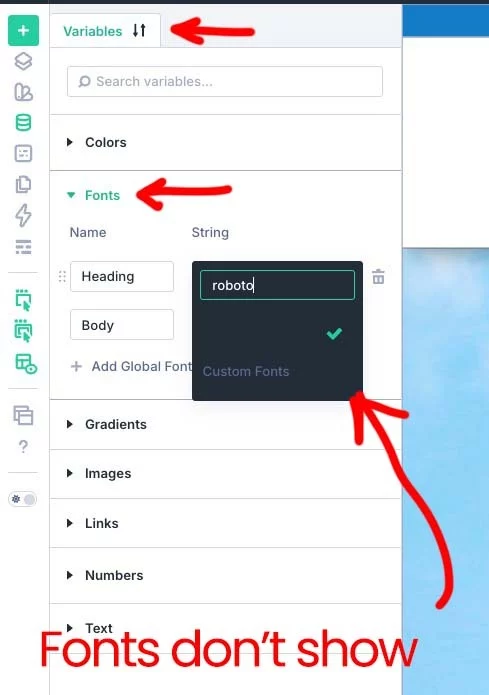

Hi Randal Randal Birkey,
I've experienced many of the same issues. One of these methods usually provides the fix, causing your Fonts display correctly.
Go to Divi > Theme Options > Clear CSS Cache
When in "Edit with Divi," click "Exit" close the tab and open anoter browser instance and try again.
If using a Cache plugin, clear the Cache.
Also, Divi > Support Center > enable "Safe Mode"
I hope one of these troubleshooting methods helps!

Wow... Safe Mode worked. I had already tried clearing all the caches I could find... server, css, browser, etc. Why in the world would I need to go into Safe Mode to make this change?
Thanks!
Hi Randal,
Divi 5 Safe Mode is a powerful diagnostic tool that temporarily disables third-party plugins, child themes, and custom scripts. Crucially, it only disables them for your logged-in administrator session only—your live website visitors will not be impacted.
Another benefit of Safe Mode, when you turn it off, you won't have to enter any of your plugin license codes again.
Since your font problem disappeared while in Safe Mode, you immediately know a third-party plugin or script is causing the conflict.
Since turning on Safe Mode fixed the issue. Turn off Safe Mode, next deactivate each plugin one-by-one to pinpoint the conflicting plugin. Then report the plugin to the developer.
I hope this helps to explain the benefits of Safe Mode.
Mark, thanks. I am aware of what Safe Mode is and what it does... however, after surviving I don't know how many alpha and beta versions of DIVI 5 and almost as many versions of SiteKrafter, Krafter, and Krafter Pro, this is the first time I've run into this issue. I was just not expecting it, and I hope it gets fixed in the next version.