
IMPORTANT UPDATE! Must Watch!
In this video, I talk about the
- licensing issue of KrafterPRO
- Divi Design system progress
- How to upgrade
and more.
Please watch this video, it answers a lot of questions.

Thanks for the explanation Mak, and yes, give yourself time at least each hour to stretch and do some pushups, health is THE most important thing, and thanks for helping us save time. You can do it! :D
PS: isn't there a roadmap for Elegant Themes where you could see and test the things they're working to try to avoid this kind of issues? remember that you made a video for Nick, but don't know if he saw it or replied.

Hi everyone. I can't watch the video properly... the right side is croped smaller so i don't see properly what's Mak doing....does anyone else have the same issue?

Prahla'd That might be due to your screen resolution. You can also make the video full-screen in the bottom right corner.

Jutta Striewe No, not working. Then it cuts off the lower and upper part of the video.
Seems that the blog is not responsive.

Klaus Fabritz Maybe "ctrl + 0" or "cmd + 0' for Mac user? if it is zoomed in?
Thanks but the resolution is fine....Didn't change anything. I can't click at the bottom right (i could if it was on Utube)... This happened suddenly for all the videos...
Hi Klaus, does this happen to you also?

Hello Mak,
I have received the latest KrafterPRO update but am unable to locate my licence key. Could you please assist me urgently?
Hello Sam,
I have received the email to watch the video and have done so. However, I have not received the email with the coupon code.
Thank you for your assistance so far.🙏
I skimmed past it the first time too.

Again, we get a half-answer to our question.
As a lifetime member, this is what I see in my Purchase History, and when logged in, I try to buy it for $1, but there is no way.
So how do we do to buy it "again"
Let me point out. As you can see, I have "bought coffee" a couple of times this year, and I do that because I believe in what you're doing, but after uploading a ticket and marking it as critical, to get an answer about a solution, and then the solution is not there, then this gets VERY frustrating.
---
Also, do yourself a favour: when a new product gets added, even lifetime members need to buy it for $1. If we as lifetime members, are not willing to buy a new product for $1 is because we will never use it. If this saves you all the hassle and saves us, members, from frustration, $1 is a gift.
Pedro Alvarez He explains in the video linked to the email. I had the same challenge but went back to watch the video.
Sam Crowe yepp, no problem any longer, this comment was added yesterday
Today, when we received mail with the video, it was no problem at all, I now have a license :) sorted
Pedro Alvarez cool. Glad you got what you needed. At one point I was willing to give up and begrudgingly drop another couple of hundred for FOMO! Trying to pay it forward where I can.

thanks for your immense effort, I appreciate that a lot. Es wird gut werden.


Same here!
Hi Mak,
Thanks for that explanation. I don't see any way to buy Krafter Pro Lifetime for $1 in my dashboard. So, is it safe to assume you haven't implemented yet?
Also, I purchased a VIP Lifetime membership with Funnels to Income (your old site). Does this entitle me to a Lifetime Membership with Divi University and access to all your products here?
I ask because several items here (Member Events, Live Workshops, Tech Help, Email Marketing Automation course, etc) still remained locked out to me.
Thanks,
Bryan

I haven't implemented the $1 yet. I will send an email out, was waiting to see if that would be a problem for anyone first.

Thanks for the update Mak, it seems like you're currently having to play whack-a-mole with ET but you'll get there.
I'm only now just finding time to play with Divi 5 and Krafter Pro so I might be missing something, but using the latest version of Divi and KP 2.1.8 I can still set the secondary colour myself in the Variable Manager. The secondary colour issue with it being based off the Primary colour is only there when using Divi's new Variable Generator, then using the Secondary Color Hue Offset then allows us to change it somewhat.
Anyway as long as I don't use the Variable Generator and just set the colours manually that works fine with KP correct?

I purchased Krafter in December which was upgraded to KrafterPro when that came out but there's no licence key in my account or downloads?

What Mak says in the second part of the video about licenses also applies to those who switched from SiteKrafter to Krafter from the start. Mak told us not to buy KrafterPRO again if we already owned Krafter and were Lifetime members. As a result, users like myself don't see a license in the "My Account" dashboard, making it impossible to enter a valid license key in the plugin.
--
The $1 isn’t the issue, but how are we supposed to complete a $1 purchase if "Krafter" is still showing instead of "KrafterPRO" in the "My Account" dashboard? It’s understandable that Mak needs to protect his development.
--
He wasn't the only one affected when the Elegant Themes video was released. Divi 5 is finally growing up and leaving its infancy behind.
--
When I saw the update, I actually thought Mak had sold his design system to Elegant Themes. However, it seems Elegant Themes noticed Mak's color management early on, and that was exactly the piece Divi 5 was missing.
--
Even the prefix management for a naming convention was implemented very well. Someone clearly did their homework and likely read and understood the articles on diviuniversity.com. It seems Elegant Themes has finally realized what Divi 5 was still missing.
--
Mak had the vision and did a great job early on—the Divi 5 innovations are proof of that. This is true even for those of us who put so much heart, soul, and time into supporting the community and, ultimately, Mak himself. But as long as the licenses don’t work and that annoying banner doesn’t disappear, some users might change their minds. I’m curious to see if there will be a solution to this problem.
--
Maybe waiting for the license keys will give me a forced break. My wife will certainly appreciate it ...
... or until then, I will work with the solution from Elegant Themes and focus on getting to grips with it.

Frank Schlatter Thanks for the post. I am in the same boat.
To clarify, Krafter Pro is the updated product that was formerly named Krafter? If so I purchased Krafter (Lifetime) and now cannot register Krafter Pro for the same reason as you.
Hi Robert,
Mak’s email with the discount code has arrived.
Important: In the Fluent-Card shop, don't pick the annual membership on the first page. Click through to select the Lifetime Membership instead. Add the discount code there, and your total should come to $2.97.
Once you pay (via PayPal, for example), your license key will appear. Just copy and paste it into the KrafterPRO plugin under "License," and you’re all set.
I also received the link for the JSON version 2.4 via email. Remember to upload the plugin as a .zip file directly to WordPress. If you unzip it, you'll find the variable and preset JSON files hidden in the folder structure. I tested some older JSON versions too, and everything worked perfectly.
A quick tip for your workflow:
I’ve started using the WPVivid and WPVivid Snapshot plugins.
- I run a full backup with WPVivid first.
- Then, I use WPVivid Snapshot to create "quick saves" before and after every step (installing plugins, importing variables, or loading presets).
- I use a simple naming convention for these snapshots so I know exactly where I am.
The rollback feature in WPVivid Snapshot is incredibly fast. It saved me a ton of time during the hundreds of tests and JSON imports I performed. Even though the plugin itself has a snapshot function, I prefer relying on WPVivid for extra security.
Frank Schlatter Once again, thank you for your thoughtful and detailed response. It pains me to say that I have still not received any discount code email. I am receiving lot's of other emails from Divi University so I don't think it's a junk mail filtering issue.

Thanks for all your work, Mak. Coffee coming your way! Keep going, mate! You'll come out the other side.
John Sharkey Thank you John 😅

Mak . Question about the new Divi Variable Manager "Generator" vs using KrafterPro. If we're using KrafterPro (which most of us are doing and prefer to use), the question I have is, should we or shouldn't we use the Divi Variable Generator (once we set things up using KrafterPro) at any point or would it be best if we ignore this and don't use it (as it may conflict with KrafterPro settings. Also, should we avoid using the Divi Builder Variable Generator to create Font Size, Space, Gaps, etc. and should we use or avoid using the "Add Variables To My Site" in the Divi Builder. I'm just concerned with how you feel we should be using both the new Divi Generator features or if we're using KrafterPro should we avoid using the Divi Generator options and "NOT" use the add variables to my site. What are your thoughts??
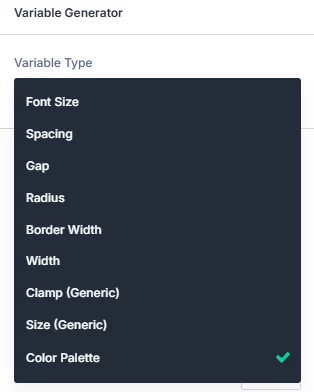

I wasn't sure, if we already tried using the Divi Builder Variables Generator, should we (after installing KrafterPro), Delete all the variables and presets in our website and then re-load the .json file for KrafterPro, so it will clean us up and not have the Divi colors, font sizes, etc., etc., loaded besides the KrafterPro colors, font sizes, spacing, etc., etc.? What would you suggest or how do you think we'd be best off handing this situation?
PS: Is it possible to just delete the Divi Builder variables that were created and leave the KrafterPro items intact? What are your thoughts on how we would be best off handling this?
Gary Gordon That's a very good question Gary. Wait until I release the updated version of the variables and presets. Divi update is missing quite a lot of things for example, you cannot generate grayscale colors and semantic colors.
Give me a few days and I will make an update 😀
@funnelstoincome Thanks!

My boat: Purchased Lifetime Membership with SiteKrafterPro (but before Krafter or KrafterPro). Am able to update and use 2.1.8 but need the "Activate License" pop-up to go away . . . ✌️
p.s. unable to load Krafterpro Design System layout to new page

Thanks Mak for all your hard work! I was able to download and install 2.1.8 and update my license key successfully. My process work fine likely because I recently purchased a lifetime membership.
I don't know if this is related to the Divi update (which I installed today), but I encountered a bug today where the rounded corners on an image weren't working in the frontend — at least not when using `clamp` as the unit. . They were visible in the Builder, but not in the frontend or the preview. Very frustrating.Jutta Striewe Did you try clearing the cache and maybe checking from the frontend to see if the styling is loaded but cancelled out by something else? I have had similare challenges witht his type of thing before completely unrelated to KrafterPro. Something in Divi. Also if you are using cloudflare or some other type of caching that might be keeping the frontend from updating.. (another useful thing for checking is to load the same link in incognito mode). Hope this helps.
Sam Crowe Thank you. I had a long chat with ChatGPT and a short one with ET. I cleared the cache countless times and tested it in a private window. I also deactivated all the plugins, which didn't change anything either. I have no idea what is going on.
I just got my Lifetime License sorted thank you for that video explainer. I had submitted a support ticket before watching the video and then self closed it bc I didn't want to jam you up for something you already covered. I'm thrilled to be a lifetime member and look forward to sharing and growing with the fantastic community of Divi people you have created. PS please accept my $2.95 as a buying you coffee contribution. Barely an inconvenience.

Well, I am showing that I have not made any purchases, but I did purchase the Lifetime membership on August 14, 2025. Currently, when I go to my account, it shows that I have no purchases. Nothing. I have access to all of the programs and videos, but it shows that I have no purchases.
Has anyone had this issue?
Jonathan Little Little Hello Jonathan. I explained that issue in the email I sent out yesterday. Did you get it.