
Not seeing any "Heading" Presets when I'm in a Text Module (where I'm using H1, H2, etc.).
Mak I'm not seeing any Heading Presets (from Krafter Pro, or SiteKrafter Pro, etc.) when I'm in a Text module.
Any advice as to what I can do to get Header Presets to show up within a Text Module, etc., meaning not just in the Heading Module??
I also tried using SiteKrafter Pro.
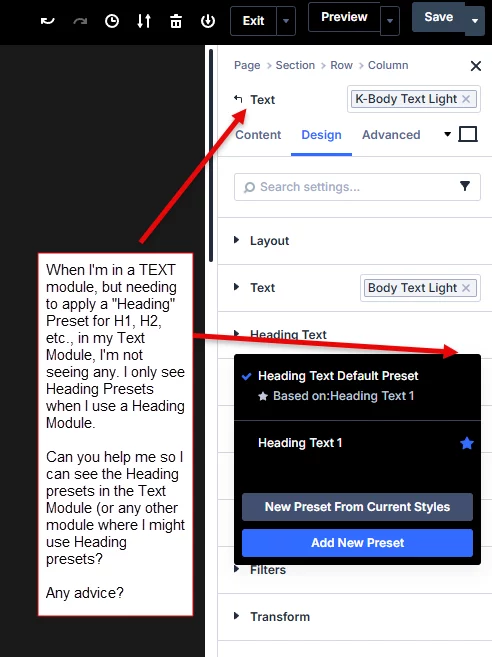

Headings cannot be applied to paragraph text. Headings have their own dedicated module, please use that instead.

Since you closed my ticket, I can’t reply there. But since you CAN add presets to this area, and it would be very helpful in this situation, can you add the Heading Presets to the Headings in this area as well?? I believe you can just add them to this area so we can use the heading presets while working with headings in the text module. Can you help with this? Thanks.

Per Elegant Theme's support: "To style all H1 headings sitewide in Divi 5 using global variables and presets, you should focus on applying your preset to the heading text fields within modules, rather than manually adding heading tags in the editor". That will work in some cases, like when you want to have a heading at the top of an article, it doesn't help those of us who want to write longer pieces with subheadings to give our articles form and structure.
Breaking up an article into numerous heading and text modules creates an editing nightmare.
There is a solution, and it is decidedly "old-school", but very effective, and not too difficult. Use global CSS! Then the tags you use will affect the headings inside paragraph text. For example, to style heading 1 tags globally on your site, go to WordPress Dashboard → Divi → Theme Options → Custom CSS and add your styles. For example:
h1 { font-size: clamp(16px, 4vw, 26px); / other styles from your preset / }
p {
font-size: 1rem
/ etc, etc /
}