

Hi,
When I downloaded the new Design System file and chose Merge, I ended up with 150 colors, 228 variables, and 541 presets.
KrafterPRO is a really good product, and I'm confident it will become excellent. However, at the moment it doesn't quite feel like something I'd be comfortable using for a client project that's going to be handed over. Every time there's an update, I end up with duplicate items or things that are missing.
Right now, it feels like you need to think twice before deciding to use it, depending on the type of client you're building the site for.
Issues like these can easily make a client lose confidence. Is there any verification process for variables and presets before updates are released?
I completely understand that building a system like this is a huge amount of work, but at the moment it feels like there are still quite a few things that can go wrong.
Best regards,
Mathias

Here we go again. I have a ton of duplicates after previewing and showing x amount of presets/variables will be updating or unchanged upon merging even though I de-selected colors and fonts.
It seems like the new version variables are named without a hyphen (e.g. text s, space m) whereas the previous version has hypens (text-s, space-m). Am I the only experiencing this?
I rolled back to the previous version (thank you Mak for that option).
I don't want to manually add hyphens to all the presets to match before uploading the new 3.0 json file. Why didn't the presets update?


Mak . Is anyone else experiencing an issue where, for example, you add a Heading module and center-align the text, but it only appears centered on the front end and not inside the Divi Builder?
This seems to have started happening recently. Has anyone else noticed this?
I tested it on a completely clean site without KrafterPRO installed, and on that site the heading is centered correctly in the Divi Builder. So it doesn't appear to be a general Divi issue.

I’m using the Krafter Design System between two websites.
- On test site “A,” which is the master configuration site, I have already configured all my presets and variables.
- I will import that entire configuration into site “B.”
- As I continue working on site “B,” I may want to update or correct individual presets.
- When I update a preset on site “B”, I want to copy that change to “A” —and vice versa.
- Some presets I do not want on site “B” copied back to site “A”, because those are design choices for that site only and not a part of the master set on site “A”
What is the best way to selectively copy presets?
I know I can export and import the entire configuration, but I would prefer to transfer only the individual preset(s) that I want back in site “A”. Is there a way to export or copy a single or selective presets without replacing everything else?
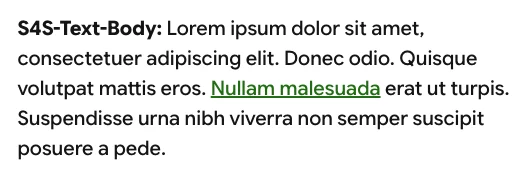
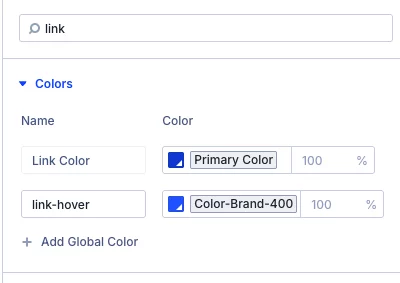
For some reason, the link color is set to the secondary color instead of the link variable in a text module using the anchor tag. How can I change it? Links in the Table of Contents are correct. Confused.

As you can see I bought the Divi 5 Mastery Course**** but I can't access the course.
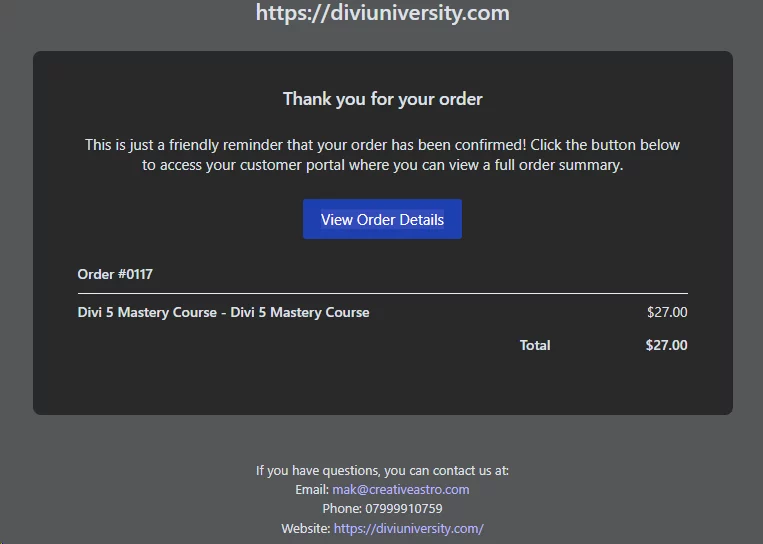
It says I need to buy it.
I wish I could master Divi 5, but I paid, and I am blocked.
I sent numerous emails, but this question was never solved.
Please try to solve my problem.
Thanks.

https://1168sunrise.org/wp-admin/index.php
2 problems. (1) Posts. When I try to add a new post it overrides the existing post. It is in the post, I have not added post to website until it works. (2) TABLES. Uploaded Contact table from Excel. Can not Enhance attributes KrafterPro or DIVI. Can you help! Thanks, Jean
Hi Mak (and community),
Is anyone else having this issue? When I am in the theme builder trying to edit a template, the image does not show through a gradient overlay preset; only a solid background.
Additionally, I am unable to select an image or gradient in the module settings. It will only work with presets. Is this a Divi 5 issue or a Krafter Pro issue?
https://www.loom.com/share/d0c0f9a091e34befa2c6f1b621bab240
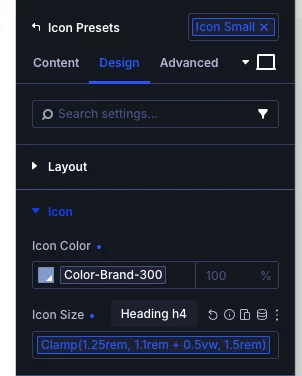
I've been tuning my preset items. I am struggling with sizing the icons. I have four presets, and none of them are doing what I expect.
First, the color is not working. Second, I used the "Heading h4" variable on the Icon size, and the color and Icon size do not change. I am so confused.
Any wisdom from the group?
Hi Trent were you able to upload the single json file? You had mentioned you were confused by the variables.json and presets.json boxes. I posted a link in the KP community, but it has been deleted so I'm reposting here.
https://www.loom.com/share/55b660ab98be4292a16164d57a260d91