
Confused on Icon Preset
I've been tuning my preset items. I am struggling with sizing the icons. I have four presets, and none of them are doing what I expect.
First, the color is not working. Second, I used the "Heading h4" variable on the Icon size, and the color and Icon size do not change. I am so confused.
Any wisdom from the group?
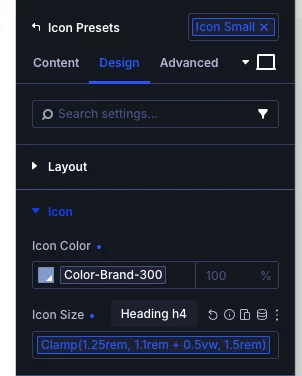

Hey, I had the same results when I attempted to duplicate one of Mak's icon presets. So, the easiest workaround I found was to simply add a fresh icon module (do not select k- preset), style it the way you want and then select the "create new preset from current styles". Or you can just select "new preset" and then style it the way you want. I hope this helps.

Jennifer, thank you. That did not work as expected. I created new variables, a set of test presets, and a new row, and used fresh icon modules. I am getting the same results (all the same size). I wonder if the row or column settings have some influence? I will keep testing.
Dougie W Hi Doug. I made another video for you. I forgot to mention (no audio, I typed a message in a text module) that even though you don't see the changes to your colors or sizes immediately, does not necessarily mean it won't appear on the front end the way you want. I don't know why it does that on certain presets. Good luck.
https://www.loom.com/share/56c6a8ead95146bf8c5fab7195617bea
Jennifer A. Jennifer, thank you. I watched it, and it is exactly what I do. Things I learned: there were some sticky attributes. I added the preset, and in the color and size fields in the builder, I removed the attributes; the preset values appeared underneath. The visual builder does not show the changes; the preview does.
BTW, I loved the video, thank you for taking the time to make it and show me.
Here are my examples. https://dougwade.com/