
Weird Space below Heading Text
Does anyone else experience abnormal extra space below Heading text?
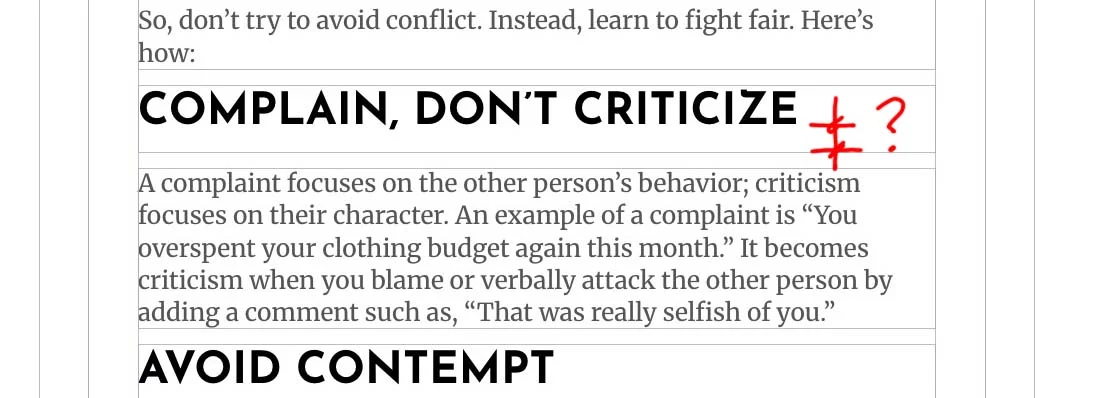
Attached is a screenshot of a heading in Josefin font, all caps, preset at K-Tilte-XL. There seems to be abnormal space below the bottom of the text, and the heading block itself.
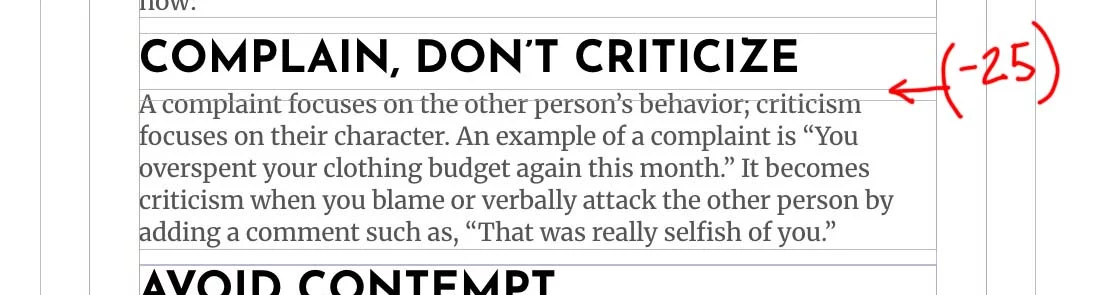
The only way I have been able to get that gap closed up is to add a -25px to the bottom margin - see image. I don't like that solution.
The Row Column is set to K-Layout-Stack-Xs
What am I missing?

Randal Birkey If the page is public, can you share a link to the page with us here?

Sure
https://mattaboutmoney.com/2026/11/03/how-to-fight-fair-about-money/
I just sent you a DM through here. -Gary
I was able to find another workaround that is better than using the -25 px Heading bottom margin setting. I added the "Spacing" element to the Heading > Design > Heading Text area, and I used the "Space-0" preset for the bottom padding. That removed some of the space within the Heading Module below the bottom of the text.
It still seems weird to have to do this, and I don't see why it should be this way.
OK, today after updating this client site with KPro 5, and the design system, I changed the way I worked out the spacing on this page. I set the Row > Column to "K-Layout-Stack-0" which closed the gap under each heading. Then I only needed to add "K-Padding-Bottom-M" to the text modules. This created the right spacing between the headings and body paragraphs under them.