

After Full Scan, Leaving Window, Results Go Away
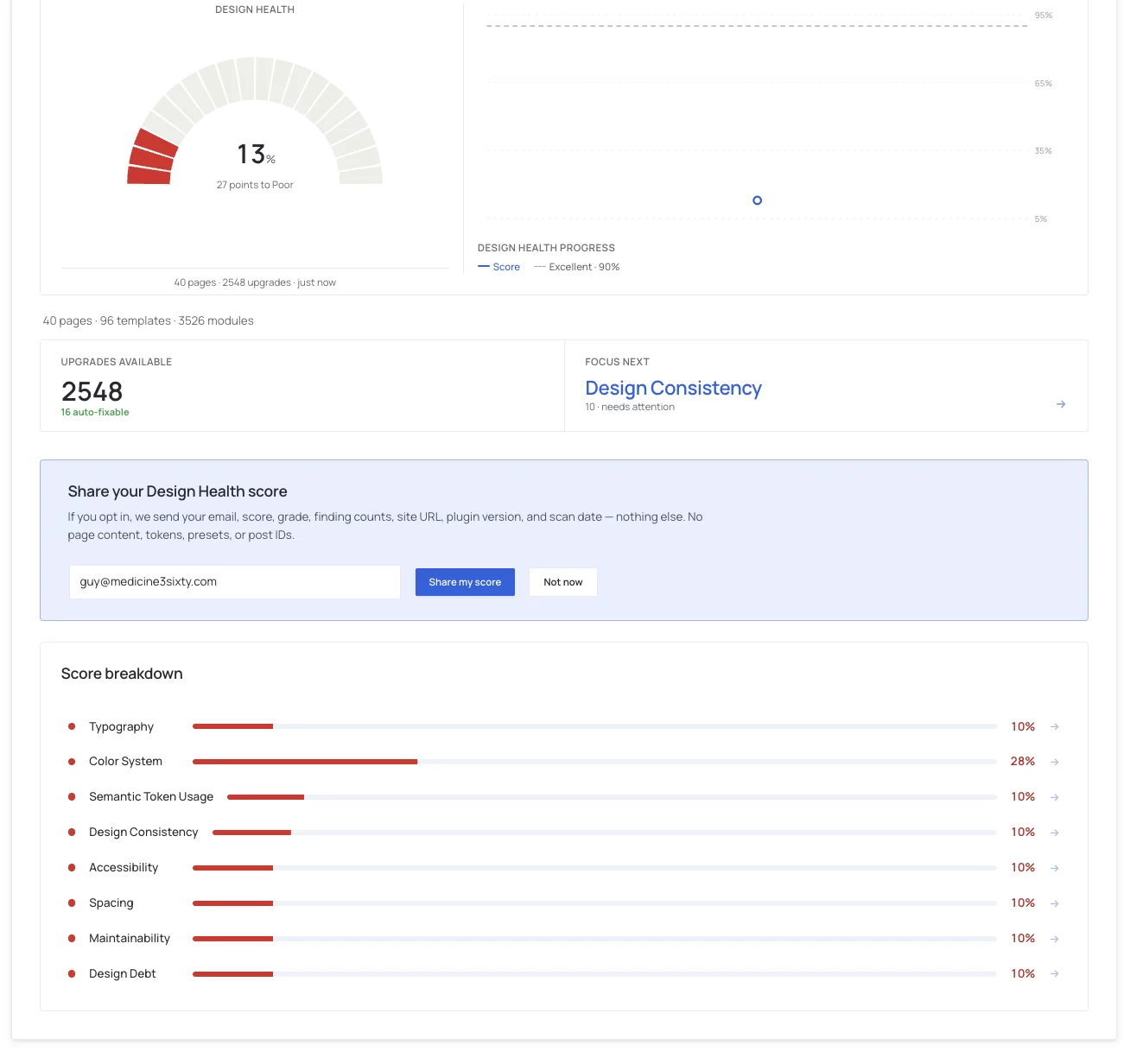
After I do a scan, the below information disappears entirely not allowing me to click on the upgrades available anymore or any of the other information. it all disappears forcing me to do a rescan to get that information back. I'm not sure if this act is using tokens or not. But I would prefer to see this info entirely unless I do another scan. I don't see any way to export this information so I can give give it to claude/chat to analyze for me and create my own systems. I have both nova mira and krafter pro installed. I was hoping krafterpro would act like the enforcer of consistency and scans for those inconsistencies and clean up.
I need these results to stay, but they are not. Is this a bug? I have no other way of accessing those data results after scan and leaving. And, I need an export to give it to my AI too.
___Claude Told Me....
What Krafter Pro actually is
It is a design system management tool built specifically for Divi 5. Per Divi University's product page, it ships a Brand Studio, a Variables Manager, preset management, import/export of design systems, fluid typography and spacing, accessibility rule enforcement, and a Design Health Scan that identifies styling inconsistencies. It also has snapshots before changes, preview-before-apply, and atomic all-or-nothing operations.
The key distinction, since you asked what it does for a system you already have: it does not give you a design system, it enforces one. Divi 5 already lets you define global colors, variables, and presets. Nothing in Divi makes anyone use them. A designer can open a module and type #0d4f5c directly instead of picking the token, and Divi will happily accept it. That page then looks right and is wrong, because the next time the brand teal changes, that module does not move.
That gap between "looks consistent" and "is systematically consistent" is exactly the question you are asking. The Design Health Scan is built to measure it.

Thanks Heather for the detailed report you've read the situation correctly, and it's not corruption or a token drain.
What's happening: right now a full scan's detailed results (the issue list, the "upgrades available", the per-page breakdown) are held only in the browser tab that ran the scan. We don't yet save that detail anywhere, so as soon as you leave the Design Audit screen it's gone and you have to rescan to get it back. Only a small summary (your scores and issue counts over time) is stored, which is what powers the trend line and the health number.
On tokens: rescanning does not use any AI tokens or make any AI calls. The scan is entirely local — KrafterPRO just reads your Divi content on the server. It costs a bit of time on a large site, nothing else. AI tokens only come into play when you actually generate or apply fixes through Connect AI.
Export today: there isn't a one-click "download findings" button yet. If you have Connect AI / MCP set up, the audit_website_design tool returns the complete scan as JSON, which is exactly what you'd feed to Claude or ChatGPT. That's the only full export path at the moment.
What we're fixing: we're adding two things (1) the last full scan result will be saved and reloaded automatically, so it stays on screen until you choose to scan again, and (2) an "Export findings (JSON)" button right on the Design Audit screen so you can hand the data to your AI without going through MCP.
I'll follow up here when that ships. I am working on this tonight.