No default design system available
Hi Mak,
I'm trying to set up a fresh Design System with KrafterPRO but I'm stuck on two related points:
- According to the documentation/video, a "full-featured" example Design System file should be available for download in the Divi University account area, but I can't locate it anywhere.
- In the current plugin version there's a button to create a new, empty Design System — but clicking it doesn't do anything on my end.
Steps to reproduce:
- Go to KrafterPRO → Dashboard
- Click "Replace" and then "Install Design System" to create a new empty Design System
- A new Design System should be created/opened.
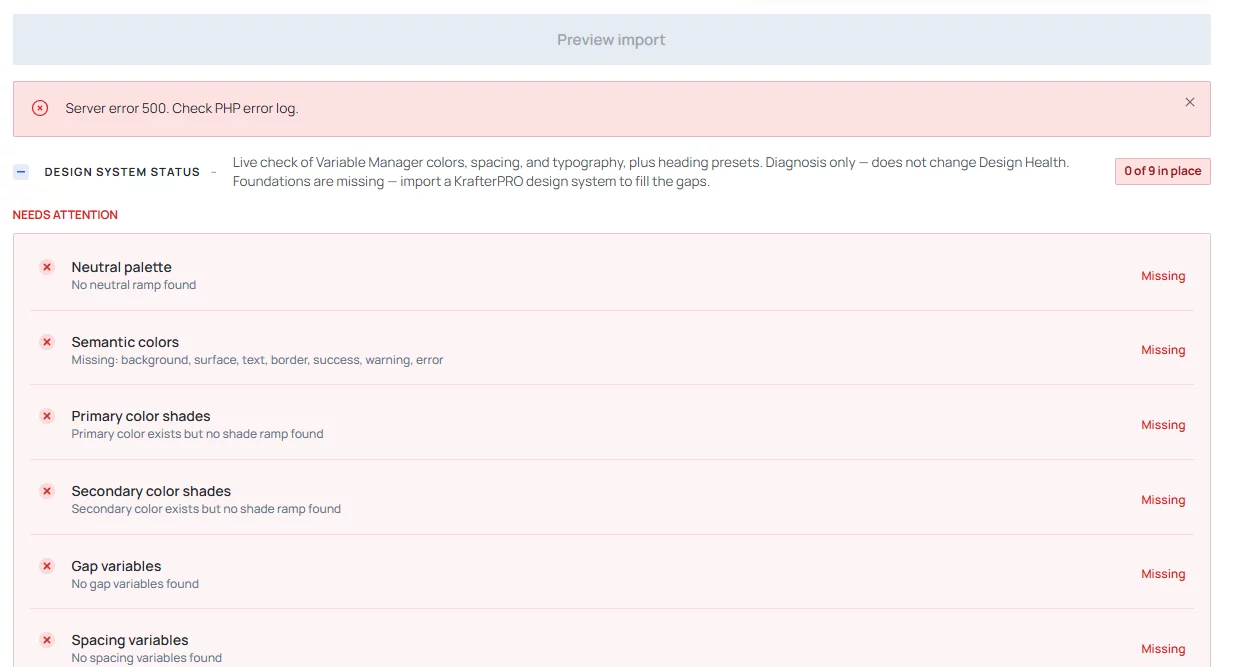
- The page page just reloads and shows a lot of errors, starting with "Server error 500. Check PHP error log."
Environment:
- KrafterPRO version: 4.2.17
- Divi version: 5.13
- WordPress version: 7.1
- Site URL: local site, test server
- Browser + version: Brave 1.95.101 (64-Bit)
Chromium: 153.0.8010.37 - Same on Firefox 156.0 (64-Bit)
Already tried:
- Cleared page cache and browser cache
- No plugin conflict test, just WP Divi and KrafterPro installed
Could you confirm whether this is a known issue in this version, and also point me to where the example Design System file is actually hosted? Happy to send a screenshot if useful.
Thanks!