

Divi University has now grown to over 3,600 members, and I just want to say thank you.
As the community grows, I want to make it more organised, more useful, and more community-driven.
I don’t want this to be just another Divi group where people ask random questions and disappear. I want Divi University to become a place where Divi users can learn, build, get feedback, improve their design skills, understand Divi 5, use better workflows, and grow as freelancers or agency owners.
Over the next few weeks, I’ll be working on improving the community structure with areas like:
- Start Here
- Build Better Websites
- Fix My Website
- Website Reviews
- KrafterPRO Lab
- Freelancer & Agency Growth
I’m also thinking of introducing weekly activities such as build challenges, website reviews, KrafterPRO tips, member showcases, and practical Divi 5 workflow discussions.
I’d also love to involve more people from the community. So if you’d be interested in helping as a community champion, reviewer, guide, or contributor, let me know.
Before I finalise everything, I’d love your input:
What would make Divi University more valuable for you? I want your ideas and input please 🙏🏾
Website reviews? Live sessions? Build challenges? More templates? Starter sites? Certification? Client workflow training?
This is the next chapter for Divi University, and I’m excited to build it with you.
Mak

Is there an approximate release date for KrafterPRO 3.0? I understand there’s a lot to fix due to the updates from Elegant Themes.
Best Regards
Mathias

Imagine standing outside during a fierce storm. The wind is howling, and the ground beneath your feet keeps shifting. That is exactly what working with web design feels like right now.
Every single week, Elegant Themes rolls out new updates for Divi 5. It is now at version 5.8.0. New features are stacked on top of old ones, bugs appear and disappear, and the entire community is feeling dizzy. People are frustrated because the rules change every seven days.
But in the middle of this storm, one creator has been working with a quiet, fierce dedication. His name is MAK, the mind behind KRAFTERPRO 3.0 and Divi University. For over a year, pouring his heart, his nights, and his energy into this project, he has been building a shelter for all of us.
Here is why his work is not just valid, but absolutely vital.
When you install KrafterPro 3.0 on Divi 5, something magical happens. It doesn't feel like adding more heavy code to a heavy system. Instead, it feels like spreading a massive, starry mantle across the vault of the night sky.
It is a blanket of stars that gives the darkness a beautiful light, transforming a confusing night into a clear, bright dawn.
Many people are worried that the constant updates from Divi 5 will break their websites. But they don't see the true genius of what MAK built. KrafterPro 3.0 is not a fragile decoration; it is a living ecosystem. Because its foundations are rooted in a deep understanding of structure, taught in his Divi 5 Mastery II and Divi 5 Workflow courses, it doesn't fight the updates. IT ABSORBS THEM!I
No matter how many new features Elegant Themes throws at Divi 5, MAK’s system naturally wraps around them, keeping everything perfectly responsive, organized, and unbreakable.
MAK is not stopping. He is currently working himself to the bone, balancing being a developer, a teacher, a husband, and a father, to create a massive library of components and ready-to-go starter sites.
We can already see the next evolution of this system, a concept we can call Fast and Mirabilis (Fast and Wonderful):
Immune to Change: These templates are built inside the design system. When Divi 5 updates, the templates already know how to handle it.
Lightning Speed: Instead of tweaking hundreds of tiny buttons for a single text box, you build with massive, reusable blocks in seconds.
Total Clarity: If you hand the website over to a client or a teammate, they won't get lost. The strategy is clean, visible, and heavy with quality.
MAK’s dream is beautiful: to make Divi University the ultimate global home for every web creator. But there is one missing piece to this puzzle, a small shadow on this bright mantle: Geolocalization.
Right now, if you do not speak or understand English perfectly, you are left out in the cold. It feels like being invited to a magnificent feast, looking at a delicious dish, but being forced to eat it half-cooked because you cannot fully digest the language.
If MAK brings his content closer to local communities, translating the soul of his workflow into different languages, his message will become unstoppable.
Building something great takes time, and it takes a heavy toll on the person creating it. MAK has stood by the community through Beta versions, bugs, and expensive server upgrades.
KrafterPro 3.0 is the proof that when you build on a solid foundation, you don't have to fear the future. The storm of updates will keep coming, but under MAK's starry mantle, our work will always be safe, beautiful, and illuminated.
As for me, please forgive me if I have described this entire tech revolution as if I were inside one of my own novels.
If I had been a pastry chef, I would have written to you by offering a warm, crispy Neapolitan sfogliatella, or a rich, delicious babà dripping with sweet rum. But I am a writer. I am not someone who builds websites just to sell them. Yet, just like you, I have a big dream: to build beautiful digital spaces for the readers who will follow my literary journey on Amazon. And that is exactly why I believe in MAK. I have studied his project deeply, and I am telling you from the soul: it is valid, and it is real.
This matters to me now more than ever, because my own life is about to cross a historic horizon.
December 31, 2026, will be my very last day of work. On January 1, 2027, I will finally step into retirement. At the threshold of my 67 years, after 42 years of honored service in the ranks of the Local Police of Naples with the rank of Captain, I am ready for a massive new beginning.
I am restarting like a child who has just received his very first gift.
I will pour all the passion I have into writing within Risonanze Percettive, my independent workshop of words and creative communication, the true heir to forty years of Atelier Indie since 1985. My path will continue toward territories I know intimately, not just from books, but from the real faces and deep stories I have crossed over the decades. But that, my friends, is another chapter yet to be written.
Have a beautiful life, everyone, and above all, may your greatest dreams be realized!

What a Design System Can and Cannot Do
A design system is not a silver bullet. It won’t magically save you from the constant influx of updates and feature expansions rolling out from Elegant Themes in Divi 5. As I have mentioned in several of my previous articles, it is an ongoing race between Elegant Themes and third-party tool developers. Often, as creators, we find ourselves chasing the core software publisher. Other times, we come up with ideas that don't exist in the core software yet and develop tools to make life easier. None of this changes the reality of the situation. If you are interested in the backstory, you can look back through my older posts to see exactly what went down on the road to KrafterPRO.
The Reality of Presets and Variables
Elegant Themes mentioned early on that we should use strict naming conventions for custom presets created within Divi 5. The same goes for variables. In my opinion, Elegant didn't communicate this clearly enough, but that doesn't absolve us of our personal responsibility as web designers and creators.
The same applies to dealing with different versions of variables and presets. If you create new presets under the same name—or even if you change the names entirely—it does not mean that importing these new presets won't alter your existing website. Elegant Themes dictates how variables and presets behave, and they will continue to refine this system.
In Divi 5, the name of a preset doesn't mean much; the internal ID is what actually matters. If these IDs didn't exist, the chaos would be even worse. In theory, if you adjust an existing preset (retaining the same ID) to align with new Divi 5 updates, and then distribute this updated preset as a JSON file within a design system, you reap a huge benefit: you won’t have to manually reassign the updated presets across the dozens of sections on your live website.
That sounds great in theory. In practice, however, things often look different. New settings in updated presets frequently disrupt the visual layout of your live site. Suddenly, your hard-earned consistency goes right out the window. This is simply due to the rapid evolution of Divi 5. If a design system doesn't evolve alongside it, it quickly becomes obsolete.
Reinstall vs. Merge: The KrafterPRO Dilemma
So, what is the solution? Someone was actually thinking ahead. In the past, we needed a dedicated tool—the KrafterPRO plugin for WordPress. Its "Merge" function was designed to fix this exact issue, even when you end up with a massive backlog of identical or overlapping presets after installing multiple design system updates.
Early on, I had the idea to introduce strict versioning, but unfortunately, that specific feature didn't make it into the final plugin—though plenty of other great tools did. Then again, versioning might not even be the magic solution today. The truth is, there will probably never be an easy fix for backward compatibility in WordPress, especially for third-party developers. But that is a whole different topic.
So what should you do now? Use the Reinstall or the Merge function in the KrafterPRO plugin? That is the ultimate question. Both have their advantages. But no matter which route you take, you will always have to review and touch up your website. Is that true consistency? Yes, it is—even if it doesn't always look perfectly consistent along the way.
Best Practices for Your Workflow
The solution that Elegant Themes, Mak, and I have all highlighted before is this:
- Export and Save: Once a project is finalized and complete, export all variables, presets, and assets. Keep this file safe so you can re-import it whenever you need to do maintenance on that specific, working version of the website.
- Back Up Constantly: Do this in addition to regular full-site backups!
- Freeze Updates Mid-Project: Do not switch to a new design system version in the middle of building a website unless you are fully prepared to go back and fix broken layouts. The larger the project and the closer the deadline, the more critical this rule becomes.
Is this setup satisfying? Yes and no—for me, it’s honestly a bit more on the "no" side. However, it helps immensely to hold back on updates (excluding core Divi 5 updates, though I always run a full backup before those, too).
Is It Better to Skip Design Systems Entirely?
For me, the answer is a definitive no. While I now have the knowledge and capability to build my own custom design system tailored exactly to my needs, I am still incredibly impressed by what Mak has built. Many others who were highly active during the Divi 4 era have thrown in the towel. Mak didn't, and I deeply appreciate his foresight.
I have learned to manage and work around these quirks. In fact, I now use a highly hybrid workflow. Thanks to my strict naming conventions, my custom elements and the design system tools never get in each other's way.
Conclusion
With this overview, I hope I can relieve some of the anxiety, frustration, or disappointment you might be feeling. I want to show that by learning, gaining knowledge, and taking action, you can make small adjustments to harness the massive advantages of a design system. Just remember: it is not a "Silver Bullet" (or an Eierlegende-Wollmilchsau, as we say in German) that will effortlessly solve all of your problems, whether they stem from Divi 5 or from your own workflow.

Hi everyone, I have a few questions about the new Krafter Pro version and the Divi 5 Design System.
I’m currently on Krafter Pro 2.0.19, but I couldn’t update the plugin directly and I also didn’t receive an email with a new download link. However, I was able to download Krafter Pro again from my customer account.
After resetting everything first to avoid duplicate variables, I imported it again and now I have:
- 48 colors
- 73 variables
- 171 presets
So it looks like there are many new things compared to my previous setup, but I’m not sure if this is already the latest version.
I also noticed that some Radius and Border Presets are not available for me as selectable presets. I can only select them as dynamic content. Is this expected behavior, or will this be improved in an upcoming update?
Another thing I noticed: I’m still missing some items from the video, for example the K Blurb Icon, the three new variants shown there. So I’m not sure if my download includes everything that was presented.
SO, is everything from the new Divi 5 Design System included in my Krafter Pro Lifetime license and i should wait for the a download link, or do I need to purchase the new Design System separately for $47?

I'm having nothing but trouble with my older KrafterPro designed websites as I update them to the newer Design System. So many glitches, things that don't work, missing presets, etc. It's not going well.
I just tried to update another site using the "Merge" feature and got this error
Server error 500. Check PHP error log.
In this video, I show you how to design a simple hero with the Divi Design System.
Anyone else having the problem with the fonts not showing up in Variables after upgrading to the new design system?
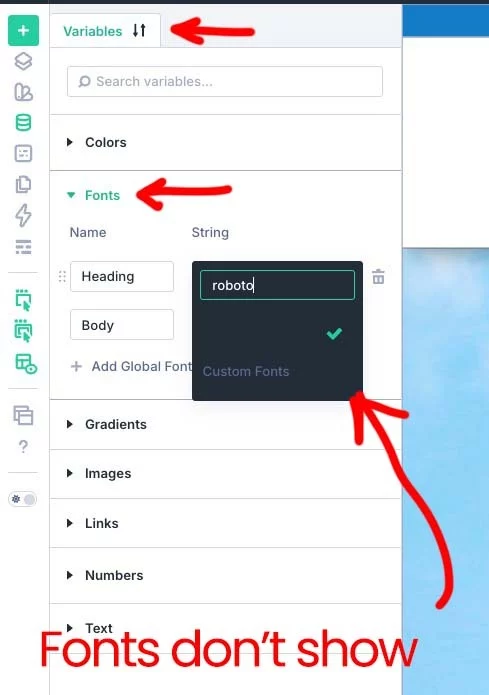
When I try to delete the pre-existing settings I get an error...
Divi REST reset did not complete. No color reset was attempted. variables endpoint failed: HTTP 404 — {"code":"rest_no_route","message":"No route was found matching the URL and request method.","data":{"status":404}} | fonts endpoint failed: HTTP 404 — {"code":"rest_no_route","message":"No route was found matching the URL and request method.","data":{"status":404}}

Has anyone else had the email mak mentions in his latest video?