

I have been using KrafterPro with Divi 5 for months now, and most of the time when I want to apply the Krafter presets to my sections, rows, and modules, they show up. But many times they don't, and all I get are default presets. That happens even if, for example, the Row is within a KrafterPRO section. How do I enable the KP presets to always show up?

Hello,
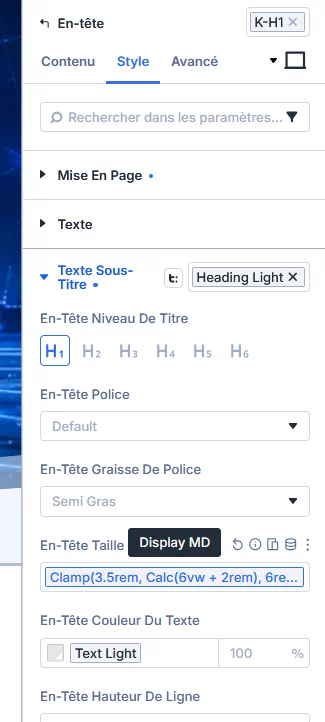
The “Display MD” selection for heading size resets when the page reloads in edit mode.
The value (heading size) reverts to “H2” ???
Thanks!

Anyone has expirience with SQL injection on your site? And how to remove it without having a backup:-).

I have been dealing with ET to diagnose a problem changing the text height in a heading setting in the text module. Many ET premade layouts use a text module to mix headings and text in the same module. When editing the heading text text height the height doesn't change in the builder but all other option groups do. We have concluded that this is caused by a 3rd party plugin. See below answer from ET.
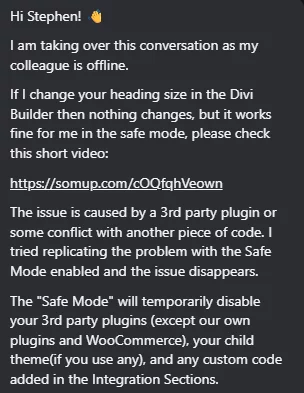
This conflict is being caused by KrafterPro and goes away when I disable the plugin.

I'm currently Working through an issue with Elegant Themes support team, and it appears that the latest KP plugin update is the problem.
Issue is that 'editor' level accounts can not edit pages, just get an endless wait, nothing happens, the blue rectangle keeps spinning (all works fine for admin level) and they were previously able to edit pages (3 separate clients with same problem)
Very simplistic trial and error process of turing off/on plugins and KP is the one that causes the problems.
response from ET support is....
"So that plugin may be creating a conflict. You can try to contact the plugin developer and report the issue or consider disabling the plugin and searching for an alternative."
UPDATE: 05/09/26 - just checked again, and the latest update v4.2.10 does nof fix the problem either
UPDATE 09/09/26 plugin version v4.2.12 seems to have fixed it (thanks Mak)
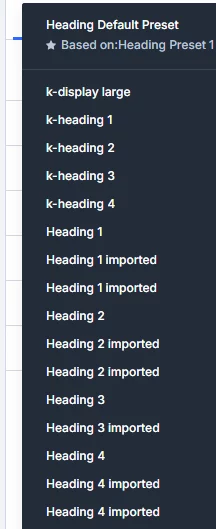
It seems that when importing premade layouts with the "import presets" checkbox unchecked presets are imported anyway, as shown below.
Is this a Divi issue or KrafterPro?
Using Design Assist to fix my Theme Builder design I get the following
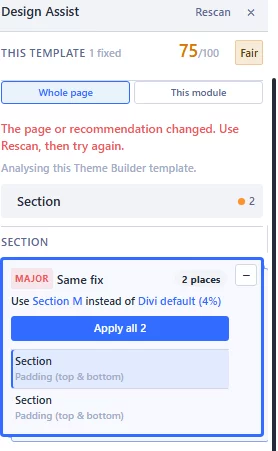
Or/and
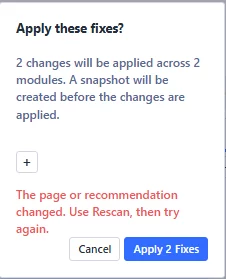
This happens on some of the premade layouts from ET as well.
Anyone got a solution or explanation?
Thanks.

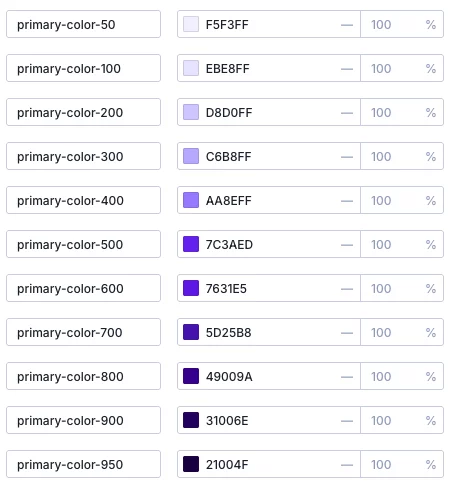
I am using KrafterPro_Design_System_3.1.3, and my primary color is blue (3a5aed), and the primary-color-50 to 950 are purple? Why, and how do I fit it?

I still need help fixing the big buttons site wide that occurred from 2 updates ago. Mak said the update fixed this and I was expecting the problem to rectify on its own, but it hasn't. I read Mak said he had to reinstall the design system, but I always get duplicates. I tried adding the CSS jason provided, but that didn't work either. Any help would be much appreciated.




Mak, KrafterPro has become impossible for me to figure out. A lot of presets from the past (Eyebrow, Badge, etc.) are missing, and the preset names keep changing constantly. I don't have the presets shown in your last video "High End Automotive Webiste" (in Group/Layout) either, even though I reinstalled the plugin about four days ago. I updated the plugin today, and now when I try to test "Frames," I get a "missing required names" error message. What is the correct procedure? How do I update the plugin and the JSON files so I can use all the features? I don't want to break my website in the process. The Replace/Merge modes are also confusing now. PLEASE provide a detailed tutorial! Maybe it’s just me, but I’m getting increasingly frustrated. It takes up so much of my time — constantly dealing with new features, names, videos, and functions—yet I can't seem to make any practical use of it anymore. PLEASE provide detailed tutorials for the BASICS. How do I perform an update correctly? How do Merge and Replace work properly without breaking the website? Sorry, I appreciate all you effort and the product is great in my opinion, but these constant troubles frustrate me a lot. I followed this tutorial: https://diviuniversity.com/download-krafterpro/ maybe it is outdated?