

Divi AI Agent video you just released.
https://www.youtube.com/watch?v=sTK0RDl8fAA
Here's my questions:
Mak, can and should we add the "Commands" (under "Reusabe command") in addition to the "Always-On Rules for Divi AI"? Or should we only use the "Reusable commands" when necessary? And is there a way to save all of the "Reusable commands" a rules that we can run, when we want to? Can you explain? ALSO, I see you have additional commands in KrafterPro, and I was curious why we can't just "Send to Divi AI" like you did with the Rule. I'd like to push the commands to Divi AI so I can easily use them if and when desired. Please let me know your thoughts on this. Thanks, Gary
PS: With the new Divi AI Agents, do we no longer need to use Novamira (since we're just working on Divi Websites)? What are your thoughts?

Divi AI Agents runs inside the Visual Builder as your logged-in admin. KrafterPRO can't pre-approve or block what it does — but it can (a) feed it your live design system as rules so it builds on-token, and (b) score, log and roll back every session afterward. So your job is: set the rules once, prefix each build, then verify with KrafterPRO.
KrafterPRO + Divi AI Agents — Mini Manual
What you get
Divi AI already sees your tokens, colours and presets (it reads the same Divi stores KrafterPRO writes). What it doesn't know on its own: which token to use when, the type-vs-colour rule, "never invent a new variable," and it has no score or undo. KrafterPRO supplies all of that.
1. One-time setup — the Always-On rule
- In wp-admin: KrafterPRO → AI tab → "Divi AI" card → Always-On rules for Divi AI.
- If you see a Send to Divi AI button (Divi 5.12+), click it. Otherwise click Copy, then in the Visual Builder open Divi AI → Saved site rules, paste, and switch Always-On on.
- Do not paste this into the Build chat — that makes Divi AI generate a page from the rules.
This is your safety net: presets still get named even on builds where you forget the prefix.
2. Every build — the prefix
- From the same card, copy Build command for Divi AI (the "governed-build" prefix). Save it once into Divi AI → Reusable commands as
governed-build. - At the start of every Build, run
governed-build, then continue with your actual request in the same message. - It does two things: names your live presets in chat (so
generate_layoutis allowed to apply presets afterward) and sets a definition of done — no raw px/rem/hex on type, every heading/text on a preset.
3. Clean-up commands (use as needed)
Save these from Commands for Divi AI into Reusable commands and run one at a time on a finished page:
| Command | Use it to |
|---|---|
| Audit this page against our design system | List every hardcoded value and name the token/preset it should bind |
| Replace hardcoded spacing/colour with our variables | Rebind px/hex to your scale tokens |
| Consolidate repeated styles into our presets | Fold repeated one-off styling into presets |
| Fix text contrast to WCAG AA | Move failing text onto your colour-role presets |
| Standardise headings to our type presets without changing colour | Size/weight/line-height from type presets; colour stays put |
4. After every Divi AI session — verify
- Design Health — run it to score what actually changed.
- Protect → Activity log — every mutation the agent made is recorded, with actor.
- Rollback — if a run went wrong, revert it in one step.
- Optional belt-and-braces: KrafterPRO → Apply design system to bind and clean anything the agent left as inline styles.
5. Re-sync the rules when the system changes
After Brand Studio edits or an Import, go back to the Divi AI card and Send / re-copy the Always-On rule so the vocabulary matches the live kit.
Do / Don't
- ✅ Prefix every Build with
governed-build; keep Always-On enabled as the fallback. - ✅ Run clean-up commands on finished pages, one at a time.
- ✅ Design Health after every session.
- ❌ Don't paste rules into the Build chat.
- ❌ Don't let the agent invent new variables/presets — the rules tell it to stop and report instead.
- ❌ Don't skip the post-session check; that's where KrafterPRO earns its keep.
Want this as a published one-page artifact (styled, shareable link) or a Markdown file in the repo for your docs?
Mak . Please see my screenshots shown below, which have descriptions of the issues. Note, that I'm using the newest version of KrafterPro 4.2.10 and the newest version of Divi 5.12.1. I'd appreciate it if you can let me know what you think about these issues. (If it's due to something on my end, please let me know how to resolve these things. Thanks.
Screenshots:
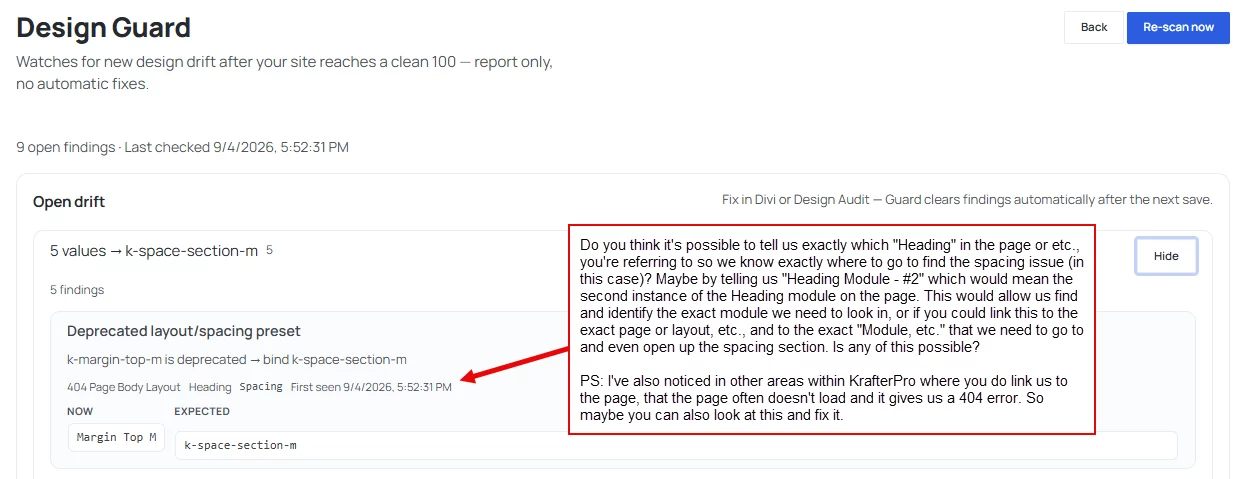
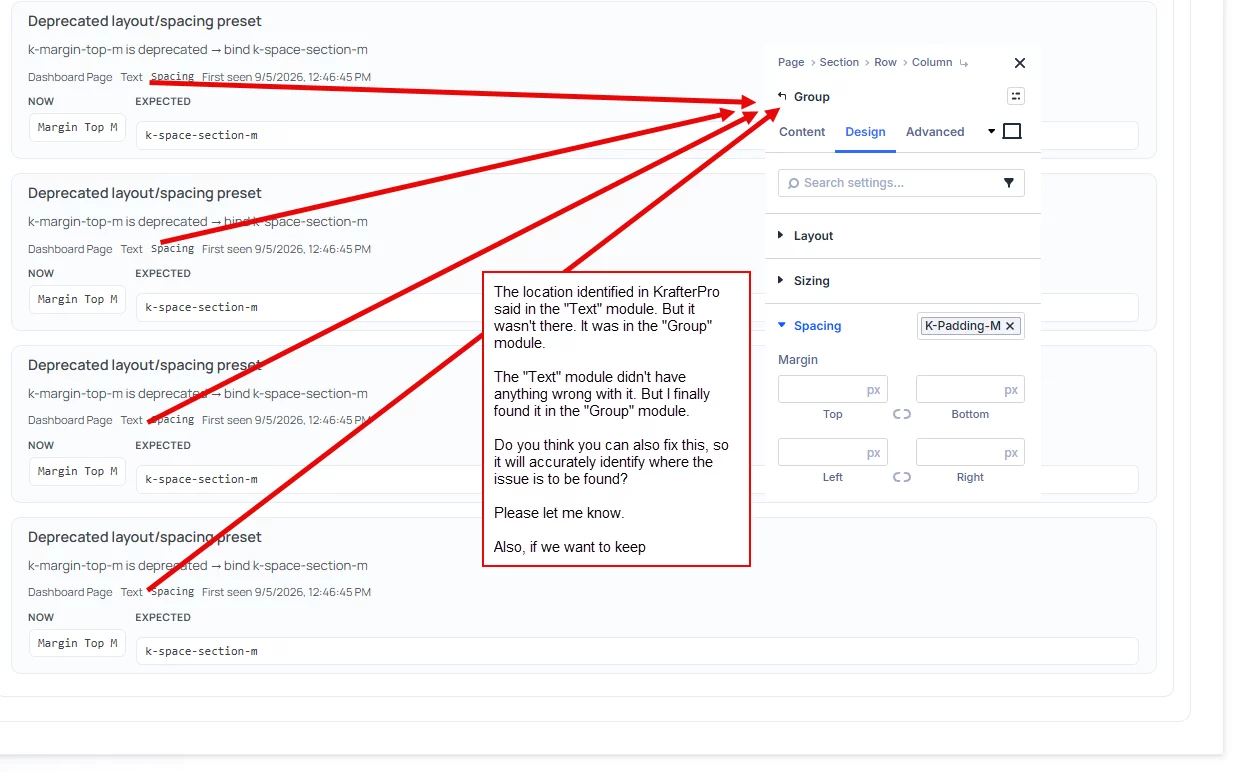
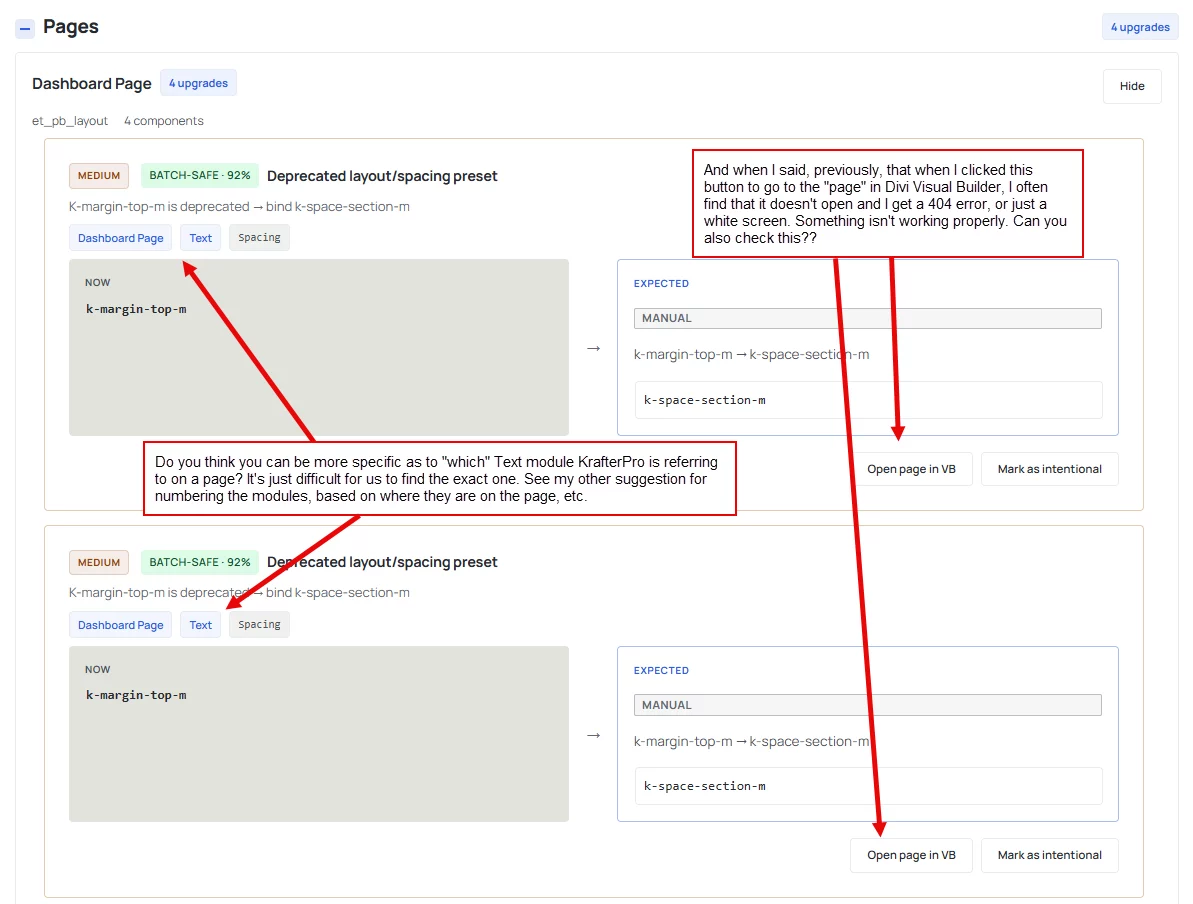
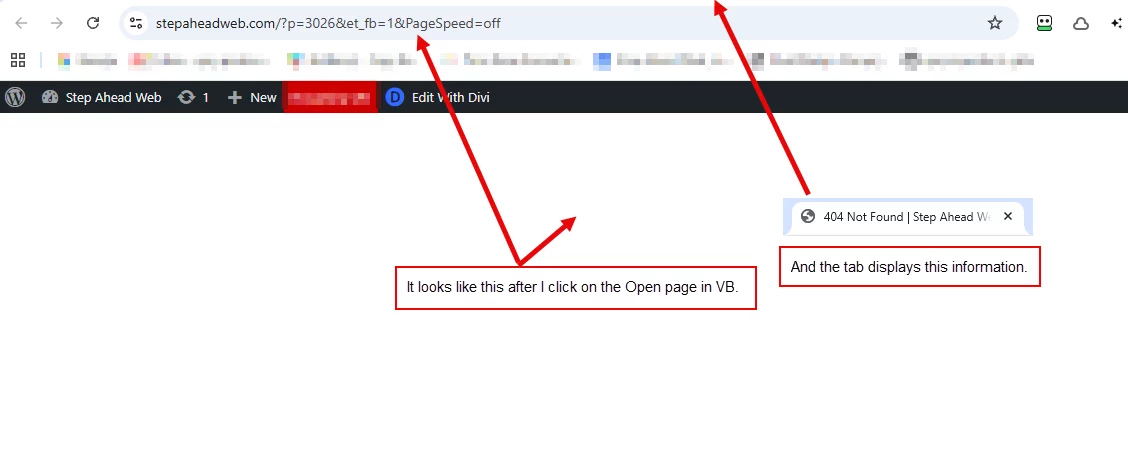
I'll be looking for your reply.
Thanks,
Gary Gordon

Mak . For your info: There is an error message with all Cloud Frames. When I try to insert this message comes up. I have version 4.2.10. installed,
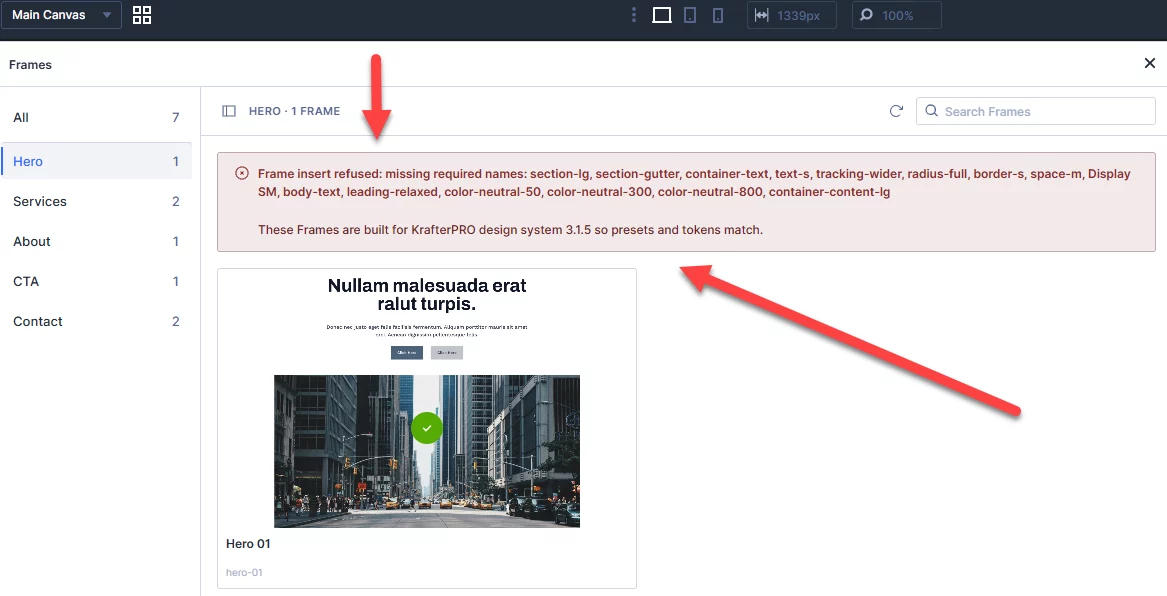

Has anyone else had problems inserting Frames (it doesn't work for me), or is it just me? If it's my setup, I'll have to live with it. I'm using KP v4.2.10.

Hi there! Hope your week was great.
I'm using my own (rebuilding in progress) site to test and practice with KP :-)
And.. even with the updates, and creating my "own system". I get challenged by KP!
I'd like to get my image responsive!!!!! And it's not... So my question is : what would be the best practice please?
On desktop: fine! On other devices... it's another story... (I'll add screenshots in comments. You're thoughts will be appreciated :-)

I like the update function very much. BUT: Automatic update is working but after that the notice about the same update is still there. Seems to be a minor Bug. Just reporting it here...


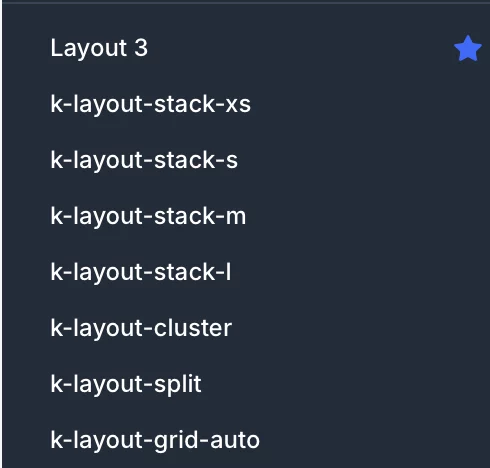
Mak . I can't find the Gap variable. Has it been removed in the latest update of the Design System?

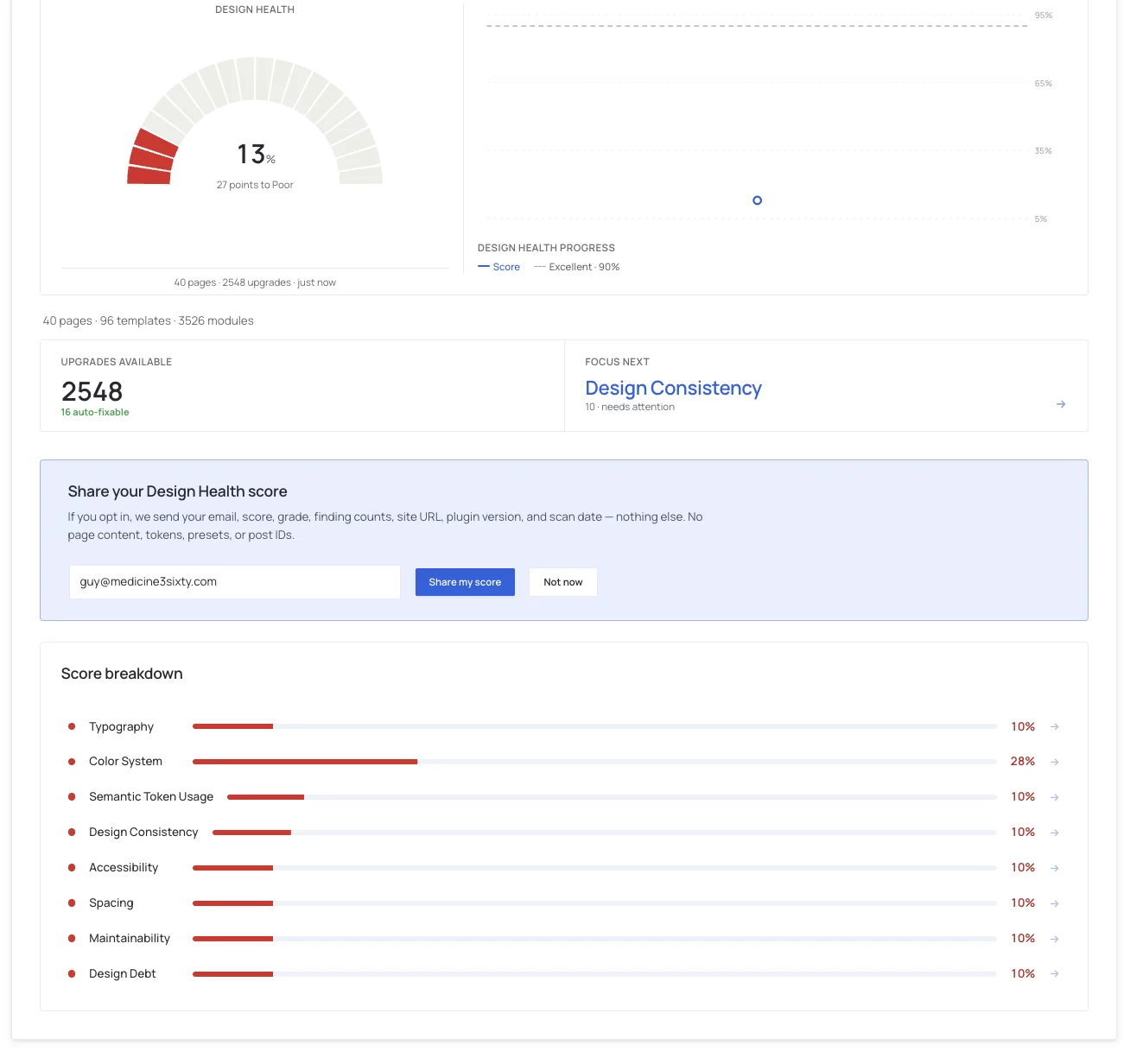
After I do a scan, the below information disappears entirely not allowing me to click on the upgrades available anymore or any of the other information. it all disappears forcing me to do a rescan to get that information back. I'm not sure if this act is using tokens or not. But I would prefer to see this info entirely unless I do another scan. I don't see any way to export this information so I can give give it to claude/chat to analyze for me and create my own systems. I have both nova mira and krafter pro installed. I was hoping krafterpro would act like the enforcer of consistency and scans for those inconsistencies and clean up.
I need these results to stay, but they are not. Is this a bug? I have no other way of accessing those data results after scan and leaving. And, I need an export to give it to my AI too.
___Claude Told Me....
What Krafter Pro actually is
It is a design system management tool built specifically for Divi 5. Per Divi University's product page, it ships a Brand Studio, a Variables Manager, preset management, import/export of design systems, fluid typography and spacing, accessibility rule enforcement, and a Design Health Scan that identifies styling inconsistencies. It also has snapshots before changes, preview-before-apply, and atomic all-or-nothing operations.
The key distinction, since you asked what it does for a system you already have: it does not give you a design system, it enforces one. Divi 5 already lets you define global colors, variables, and presets. Nothing in Divi makes anyone use them. A designer can open a module and type #0d4f5c directly instead of picking the token, and Divi will happily accept it. That page then looks right and is wrong, because the next time the brand teal changes, that module does not move.
That gap between "looks consistent" and "is systematically consistent" is exactly the question you are asking. The Design Health Scan is built to measure it.
Hi all! I bought KrafterPro because I thought it could analyze an existing website’s design and help identify and fix inconsistencies. However, I may have misunderstood how that process works.
I can’t seem to find any videos or documentation showing how to analyze a website based on its current design, rather than applying one of the prepackaged design systems that comes with KrafterPro.
For example, I may have an existing website that was built without a formal design system or consistent presets. What I’d like to do is:
- Analyze the existing site and identify inconsistencies in things like fonts, heading sizes, spacing, colors, buttons, etc.
- Determine what the site is already using most consistently and use that to establish a design system.
- Create or update the necessary global presets based on that existing design.
- Apply those presets throughout the site to clean up the inconsistencies without completely redesigning it.
Could someone explain the correct KrafterPro workflow for doing this, especially when the website was originally built without a formal design system or presets? Or none at all?
Also, apologies if this has already been answered. I don’t see a search bar for searching through these posts before asking a question.