

UPDATED TO BE MORE SPECIFIC
In Divi 4 I was able to edit text to enable italics for specific words or phrases in a text or heading field by using the italics HTML tag. Using KrafterPRO headings, I cannot see a way to italicize one or more words in the heading text.
I can create a text field that will allow me to do this, but I lose the ability to use KrafterPRO's heading styling. That forces me to revert to manually setting font sizes and font features in the way we previously did that in Divi. In the process, I lose the responsiveness of that field. Is italicizing a word in a KrafterPro heading even possible or is it a fixed limitation of the KrafterPRO structure? Or might there be a workaround that I haven't imagined?

Something big is coming. 👀
I've been quietly building something for a while now.
And today I'm finally pulling back the curtain.
Meet KrafterPRO Agency 3.0 🚀
A unified interface inside Divi 5 built for anyone who wants to design, manage, and deliver websites like a studio — not a solo beginner winging it.
We're talking:
✦ Starter sites
✦ Preset manager
✦ Style guide builder
✦ Automatic handoff document generator
✦ And that's just the start
Let me hear your feedback and let me know if you're interested in becoming a beta tester :)

👨🏻💻 Divi 5 Devlog: Fluid Sizing Variable Generator
YouTube · Elegant Themes
för 10 hours ago

What about the Starter Template file to install? Is that to be installed in the Divi Library, then imported via saved layouts? Also is there anything to install in the Theme builder? I see the templates already there. Is everything included in the Design System plugin, presets, templates and page templates? Are we missing anything after we install the v. 2.0.19 plugin?
I am updating my site before final deployment, and I had KrafterPro 2.0.1 installed. I installed the 2.0.11 plugin and selected Merge when installing the Design System. The result was that I ended up with -imported presets.
I reverted the site to the backup I made before I installed 2.0.11. Before I install 2.0.19, I would like to know if I should select Replace instead of Merge to avoid the same problem.
Download the latest version here.
Here is what changed:
Added
- Import preview: Presets are now diffed against live Divi preset data (same option keys as import). Each preset item in the file is compared to the matching id (or list index) on this site so the summary can show new / will update / unchanged counts, aligned with the variable rows.
- Import preview: Merge footer hint now states that “unchanged” applies to preset entries in the summary as well as variables.
Fixed
- Export: global_colors palette rows are now exported losslessly (hex stays hex; $variable(...) references stay $variable(...)) instead of being resolved to baked hex. This prevents round-trips from changing format when you re-import the same file.
- Import: Colors count in the import summary now reflects the number of palette rows in the uploaded file (including brand ids), not the post-sync storage shape where Divi strips brand ids into theme options.

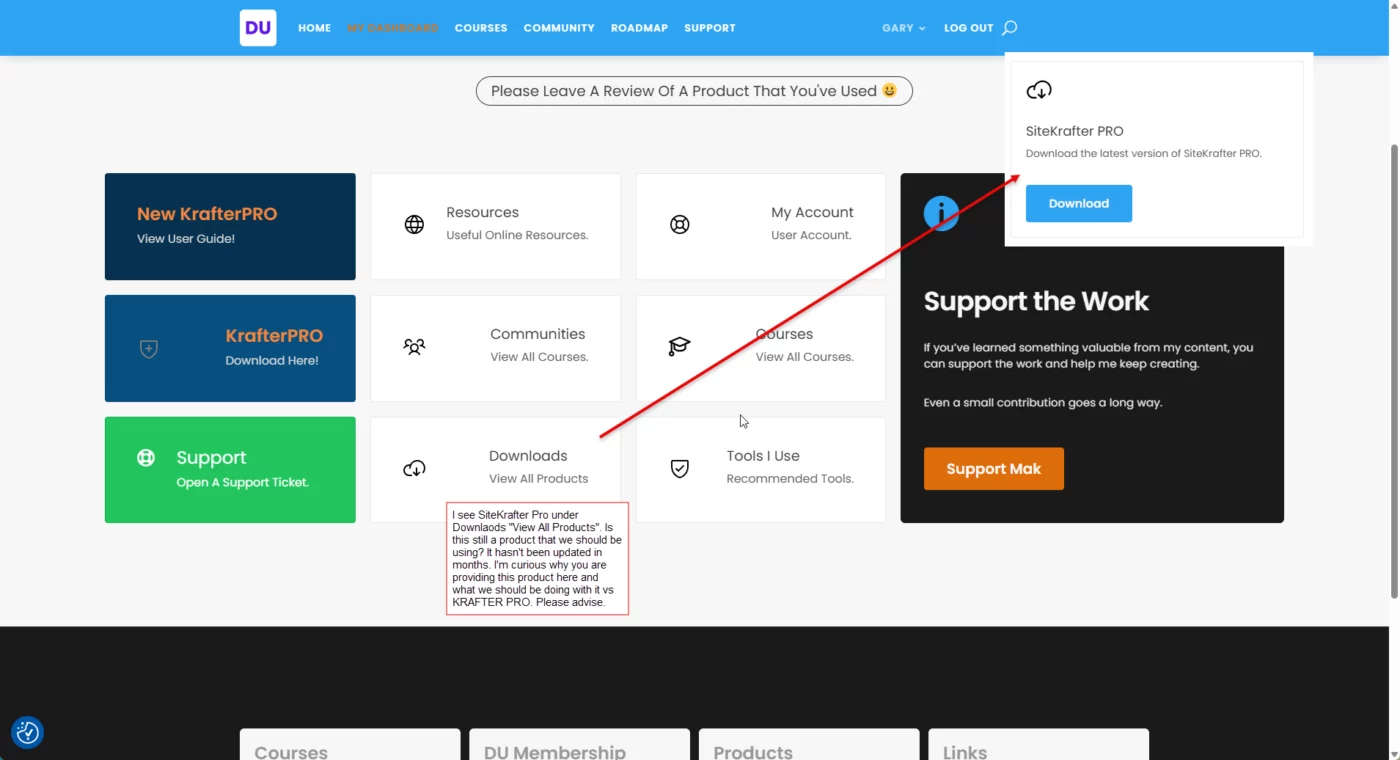
I see SiteKrafter Pro under Downlaods "View All Products". Is this still a product that we should be using? It hasn't been updated in months. I'm curious why you are providing this product here and what we should be doing with it vs KRAFTER PRO. Please advise fully as to what we should be using, what we shouldn't be using, etc.

Is there a video to show me how to do a pop up on my site. I want it to pop up after there got to the page say 5 or 10 secs. I want them to be able to fill out a quote form faster
Download the latest version here.
Here is what was updated:
FIXED
- Import: Primary, Secondary, Heading text, Body text, and Link palette colors no longer import as white when the JSON stores them as $variable(...)$ references (export resolves those in global_variables but palette rows often still reference other tokens). Import now resolves each global_colors row against the file’s palette + color variables before syncing Customizer options (accent_color, header_color, etc.).
- Import: kpro_var_resolve_color() memoisation keys optionally include a namespace so preview and import cannot reuse the wrong resolved value for the same raw string in one request.
ADDED
- Export tab: File name field shows the default download name (KrafterPROVariables{site}_{date}.json) and lets you rename the file before download. The browser uses your name after client-side sanitization; .json is added if missing. Leave the field empty to use the server default.
- Export tab: Focusing the file name field clears it so you can type a new name quickly.
- Export: Shared helper kpro_var_get_export_default_filename() so the default shown in the UI matches the filename returned by the export AJAX handler.
FIXED:
- Export: Heading and Body fonts no longer appear twice in the review list or in downloaded global_variables JSON. Theme-option font rows are appended only when their variable id is not already present from Divi’s flat global list.
- Documentation: MANUAL.md and this Changelog tab updated for export filename behavior and the font dedupe fix.

Hi All
Can I get a bit of clarification before I install the new plugin version.
I still have the original V1.0 that was imported to the Divi Library. And my site is now finished using the original.
Do I need to delete this before or after the plugin install or even delete it at all?
Thanks.