

I am a lifetime member but I don't have a license for KrafterPro....how do I go about getting one? I don't have to buy one do I? Isn't it included in my lifetime membership?

Divi 5 has just added a powerful new feature that makes it much easier to create a proper design system directly inside the builder.
In this video, I walk you through the new Divi 5 variable generator and show how you can generate colors, tints, shades, fluid font sizes, spacing, gaps, border radius values, and more — all from inside Divi.
This is a big step forward because most Divi users still design websites by manually guessing font sizes, padding, margins, and colors. That workflow is slow, inconsistent, and difficult to maintain.
With this new Divi 5 update, you can now start your website with a more professional foundation.
In this video, I cover:
- How the new Divi 5 color palette generator works
- How to generate colors from a primary brand color
- How color harmonies work inside Divi 5
- How to create tints, shades, tones, and alpha colors
- How to generate fluid clamp-based font sizes
- How to create spacing, gap, radius, and size variables
- How to apply these variables inside the Divi Builder
- Where the new workflow works well
- Where it still has limitations How KrafterPRO takes this workflow further for freelancers and agencies.
I also show how KrafterPRO helps you reset, export, import, back up, roll back, and hand off full Divi 5 design systems, including colors, fonts, variables, presets, style guides, client handoff PDFs, theme builder templates, and upcoming starter sites.
If you build websites with Divi 5, this is the workflow you need to understand.

Hey MAK,
I have been working with Krafter Pro since two months and it is really a product worthy to work with.
However, I have two questions:
- What if I want to change to clamp value - how can I do that? For example for body text, I am not happy with the clamp values - how can I do that?
- When I download and install Krafter Pro on a new website, some presets are not installed. For example, border presets XS, S, M, XL are installed and L is not installed. How to resolve this?
Thanks,

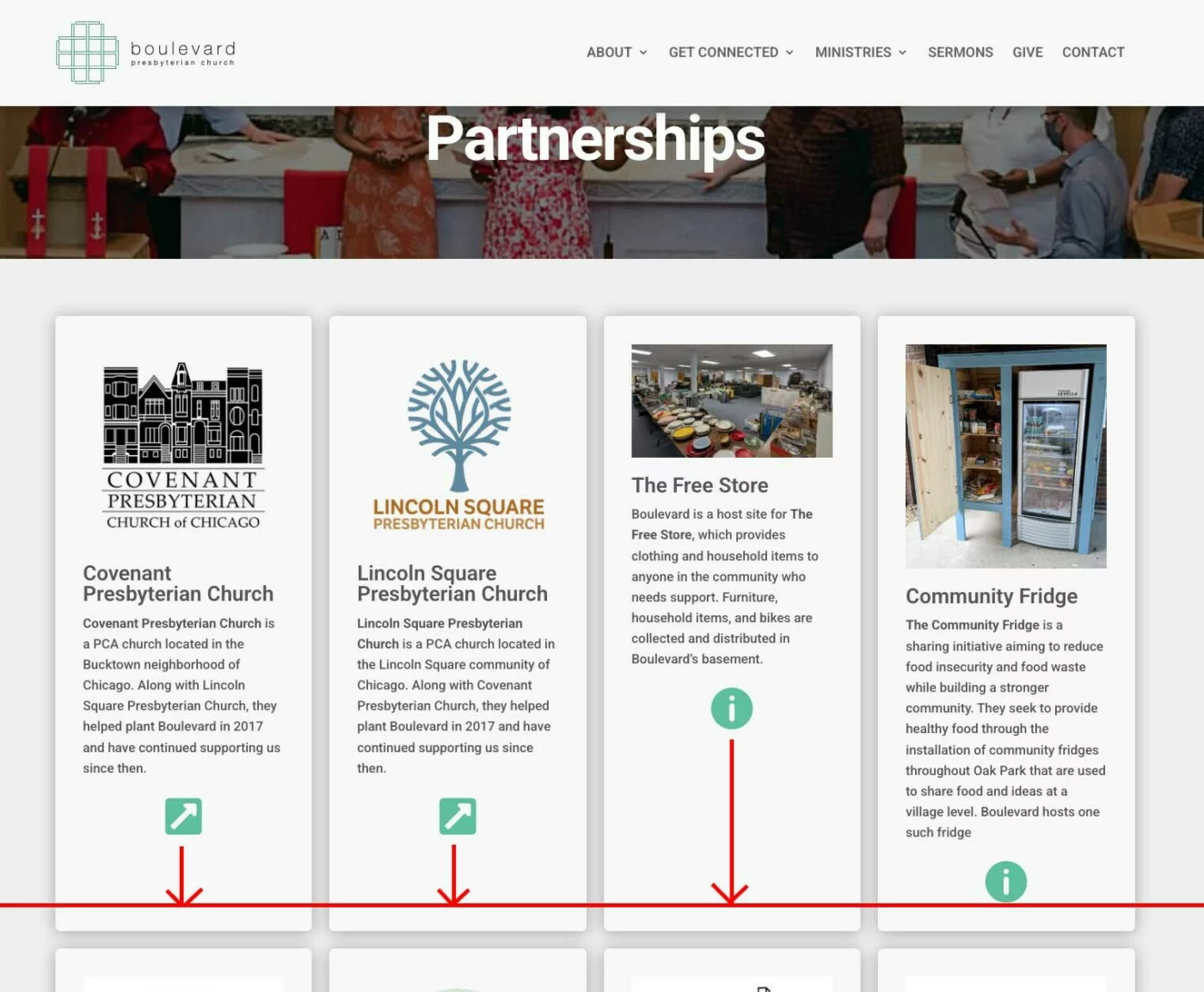
I have a client site I am converting to DIVI 5, and using SitekrafterPro. Is there a way to align icons at the bottom of a Blurb, when they are added as an Element within the Blurb?
Here is the page in question - https://blvdpres.birkey.net/ministries/partnerships/
Image attached.
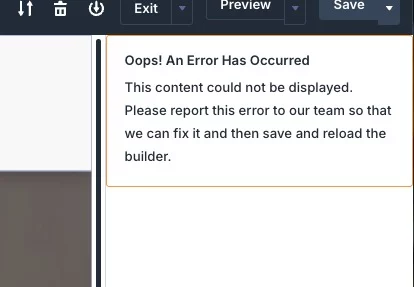
Also, does anyone else get these errors, and of so, what do you do?

Deep Dive into Divi 5: I’m back with insights! 🚀
After over a week of intense research, testing, and getting lost in the new Divi 5 variable structure, I’ve finally cracked the code. It was a wild ride involving:
- Digging deep into the Divi 5 API
- Endless database rollbacks
- Navigating tricky side effects in the Variable Manager
- Memorizing developer docs to find the "why" behind the "how"
Managing variables and categories in Divi 5 is a completely different beast compared to Presets. While the implementation is elegant, the logic is highly complex. Huge respect to the team at Elegant Themes—handling these database operations without breaking the Divi core is a masterclass in architecture.
I encountered bugs where even a "Save" button wouldn't trigger a click event, with zero errors in the console. Tricky? Absolutely.
But I’ve done the heavy lifting so you don’t have to. I’ll be sharing a series of articles explaining what you need to know when creating your own variables or importing presets from external sources.
Stay tuned!
Best, Frank
- Still on dev on the KrafterPRO Plugin!
- Spoiler Alert: Variable management in KrafterPRO is now fully tested and working perfectly. I’m now moving on to the next areas that need testing and fine-tuning.
- Stay tuned! I’ll share some simple guides on the KrafterPRO workflow as soon as I’ve handed over the next working version to Mak. He’ll handle the rollout and is being fully briefed by me.

Is there a way to make adjustments on Krafter-Lite? I'm finding the paragraph text too small.
Scaling an agency is impossible if you’re rebuilding the wheel for every client. In this video, I’m showing you a first look at KrafterPRO Agency, the tool designed to help you import design systems, automate style guides, and master client handoffs in minutes.
Whether you’re a solo dev or managing a full creative team, the biggest bottleneck is consistency. I’ll walk you through how this software allows you to:
- ✅ Import Design Systems: No more manual hex code hunting.
- ✅ Backup Presets: Keep your "secret sauce" safe and reusable.
- ✅ Instant Style Guides: Auto-generate professional guides for your clients.
- ✅ Seamless Handoffs: Make the transition from design to live site (or to the client) friction-free.
Here is the link to become a beta tester.
Thanks for helping test KrafterPRO before release. This beta touches Divi 5 global variables, presets, rollback snapshots, and reset tools, so please follow the rules below to keep your site safe and your reports actionable.
Rules (please read)
- Staging/local only. Do not test on production.
- Make a full site backup first (host backup or Duplicator/Updraft).
- Keep Divi 5 active during testing.
- If something goes wrong, stop and report before trying random fixes.
What you’ll test
- Import preview and import execution (combined + split JSON)
- Replace vs Merge behavior
- Exclusions (including brand slots)
- Export correctness + re-import roundtrip
- Rollback snapshots + restore
- Reset tools + rollback safety
- Style guide refresh + “Save as PDF”
- Downloads (bundled JSON assets)
- Admin navigation (Dashboard tabs + Help/System/Licence submenus)
- Licence/Shop gating behavior (policy validation)
How to run the test
-
Confirm environment: WordPress 6.x, PHP 8+, Divi 5 active, KrafterPRO active.
-
Open these menu items and confirm they load correctly:
- KrafterPRO → Dashboard
- KrafterPRO → System
- KrafterPRO → Help
- KrafterPRO → Licence
-
Import: preview a known-good combined JSON.
-
Import: run Merge on a small fixture; confirm expected changes only.
-
Export: export JSON; confirm it opens as valid JSON.
-
Rollback: restore the snapshot from before the import.
-
Style guide: Refresh from site; Save as PDF and confirm colors show in print preview.
-
Downloads: download both bundled JSON files and confirm they open.
Paste ALL bugs and errors here.
Here is the link to become a beta tester.


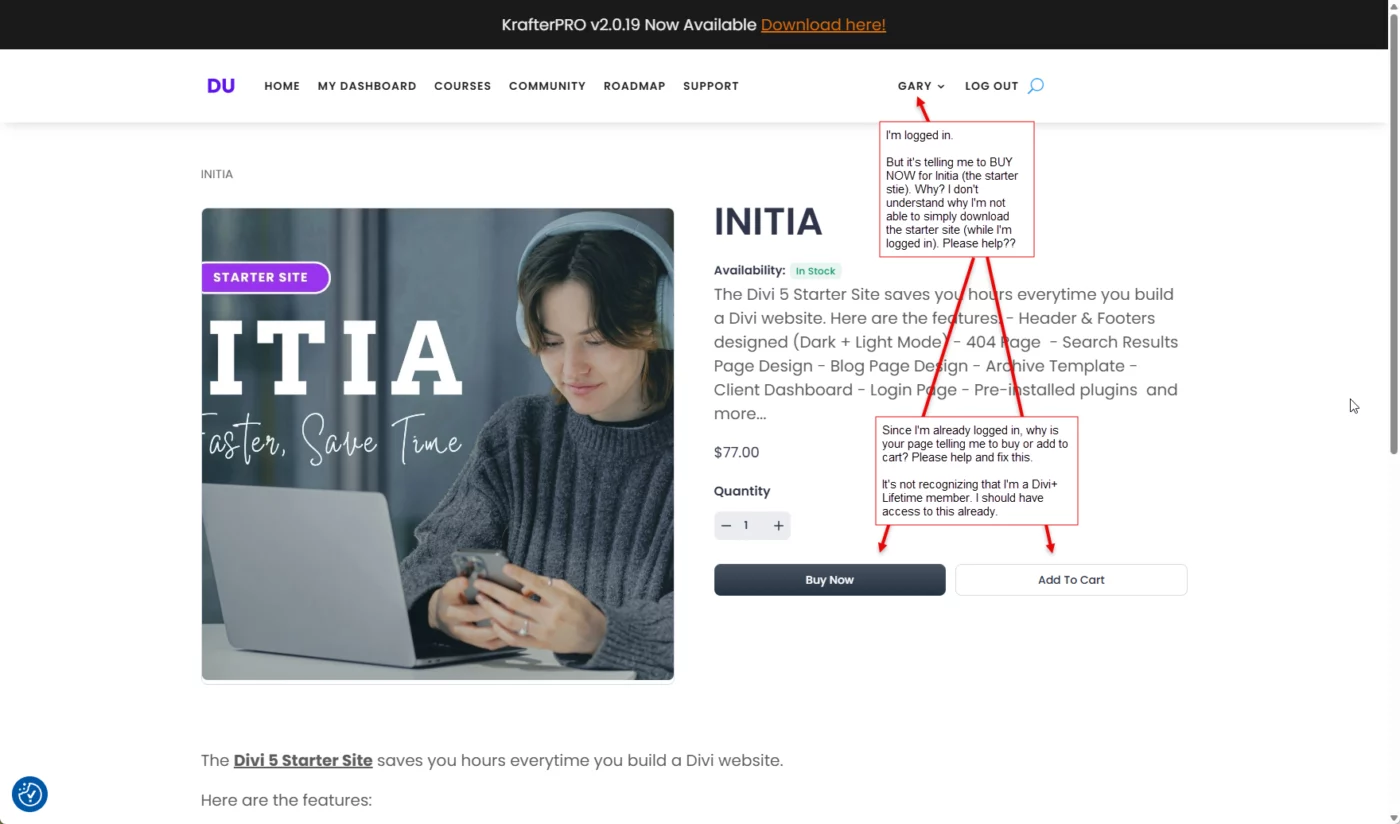
Please see the attached screenshot. The text in the screenshot says:
I'm logged in as you can see. It says "Gary".
But it's telling me to BUY NOW for Initia (the starter stie). Why? I don't understand why I'm not able to simply download the starter site (while I'm logged in). Please help??
Since I'm already logged in, why is your page telling me to buy or add to cart? Please help and fix this.
It's not recognizing that I'm a Divi+ Lifetime member. I should have access to this already.
Please help. Mak .
See the attached screenshot. The question in the screenshot says:
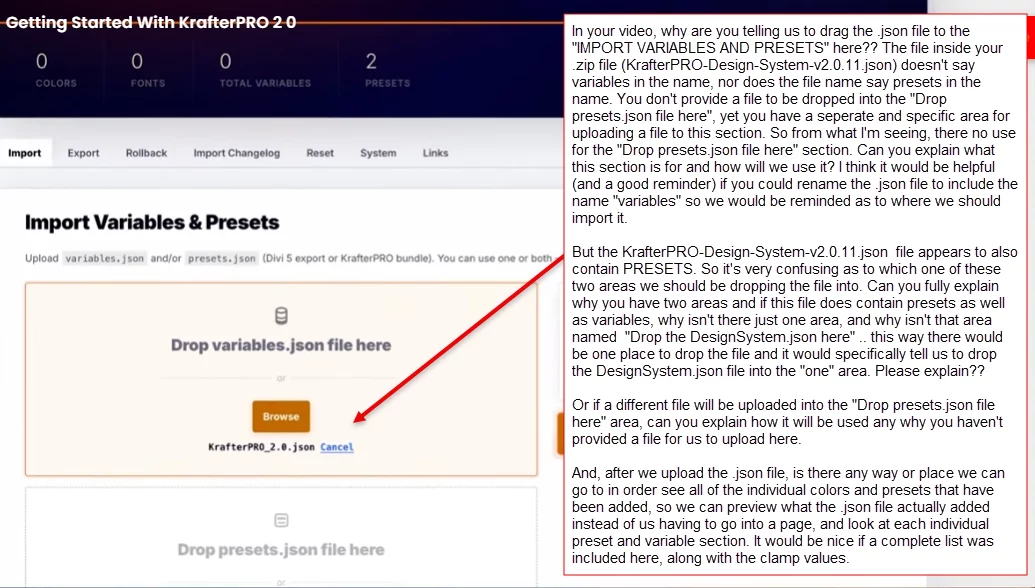
In your video, why are you telling us to drag the .json file to the "IMPORT VARIABLES AND PRESETS" here?? The file inside your .zip file (KrafterPRO-Design-System-v2.0.11.json) doesn't say variables in the name, nor does the file name say presets in the name. You don't provide a file to be dropped into the "Drop presets.json file here", yet you have a seperate and specific area for uploading a file to this section. So from what I'm seeing, there no use for the "Drop presets.json file here" section. Can you explain what this section is for and how will we use it? I think it would be helpful (and a good reminder) if you could rename the .json file to include the name "variables" so we would be reminded as to where we should import it.
But the KrafterPRO-Design-System-v2.0.11.json file appears to also contain PRESETS. So it's very confusing as to which one of these two areas we should be dropping the file into. Can you fully explain why you have two areas and if this file does contain presets as well as variables, why isn't there just one area, and why isn't that area named "Drop the DesignSystem.json here" .. this way there would be one place to drop the file and it would specifically tell us to drop the DesignSystem.json file into the "one" area. Please explain??
Or if a different file will be uploaded into the "Drop presets.json file here" area, can you explain how it will be used any why you haven't provided a file for us to upload here.
And, after we upload the .json file, is there any way or place we can go to in order see all of the individual colors and presets that have been added, so we can preview what the .json file actually added instead of us having to go into a page, and look at each individual preset and variable section. It would be nice if a complete list was included here, along with the clamp values. Mak .