

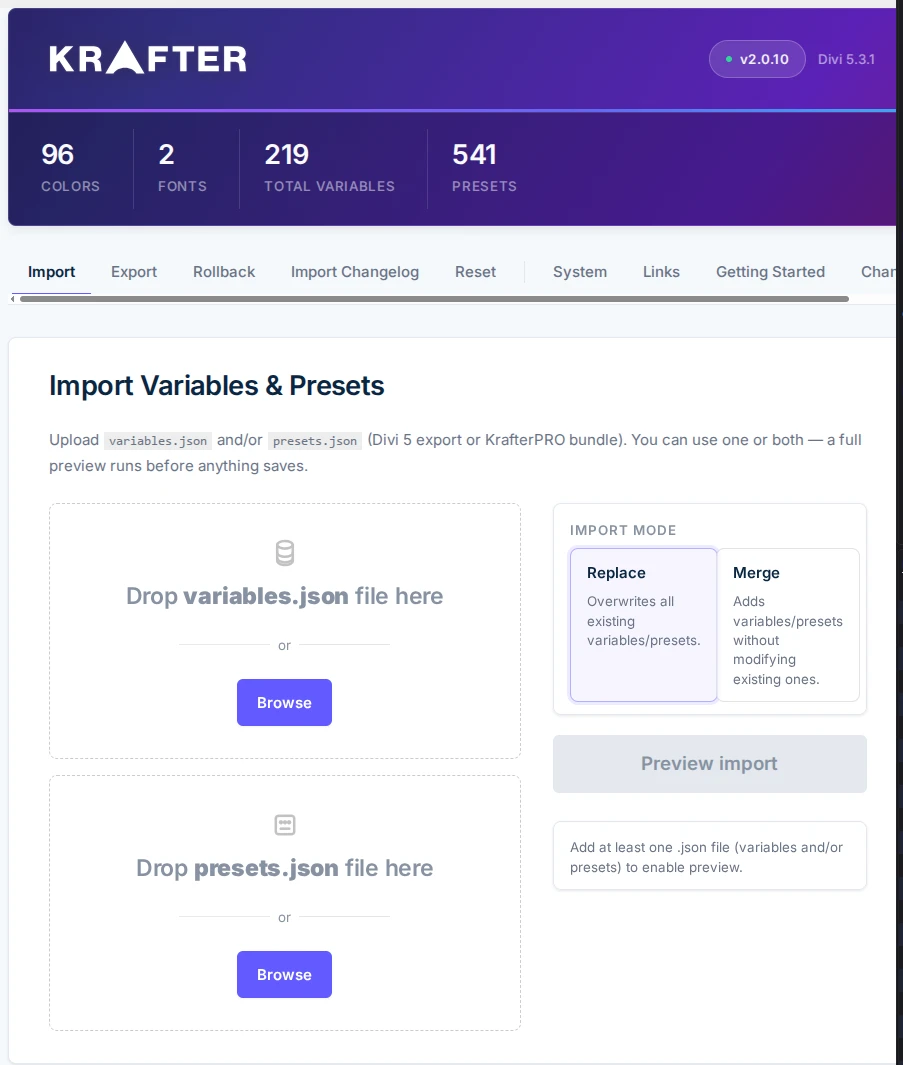

I watched the videos a few times and am confused. Can someone provide a step-by-step for a scenario like mine, where I already have my variables customized (links, colors, images, numbers). I also already have customized my own theme Builder templates so do not want to get over-written. The site is halfway completed.
After I would install the plugin, then install/import the V2.0.10 Variables JSON (Design System), I assume I should select "Merge" mode and preview what the NEW JSON wants to ADD to my existing. DO I skip this step altogether if I'm happy with my customized Variables?
So in general, am I installing the plugin, mainly for the UI in my situation or does the V2.0.10 bring any brand new variables that were not included in V1.1?

KrafterPRO Update drops tomorrow. Here's what changed:
- Simplified UI — Cleaner, faster, no clutter. Designed for people who build at speed.
- Custom Export Naming — Name your .json files properly (think: "Client-X-System-V2"). Version control. Professional handoffs. Done.
- The Big Fixes — Brand colors, heading fonts, body fonts. All syncing correctly on import. The headache is gone.
- Live Import Change Log — See exactly what's changing before you commit. Exclude specific colors or fonts on the fly.
- Precision Reset — One click. Clean slate. Accurate counters on every variable and preset deleted.

Building something that has never existed before is always a challenge. Currently, we are working intensely on the KrafterPRO code to make it the stable, high-performance tool you deserve. With over 5,700 lines of code, this is a massive project, and we are fine-tuning every single one of them.
We Hear You: Every Bug Counts
Every bug report we receive is being recorded and investigated. We are trying to reproduce every issue to find a permanent fix. Step by step, the plugin is becoming better and more reliable. However, this level of precision takes time. We truly appreciate your patience and understanding as we navigate this "pioneer work" together.
How You Can Help Us Help You
To solve technical issues quickly, we need specific details. If you encounter a problem, please ensure your environment is up to date. Old PHP versions or outdated databases are often the hidden cause of errors.
When posting a report, please always include:
- Divi 5 Version?
- PHP Version?
- Database Version? (Please check with your host if you are unsure)
The Power of Good Documentation
We are all grateful for thorough and objective documentation. If you can describe exactly what you did and in what order, it helps us find the "needle in the haystack" much faster.
Staying the Course
A plugin like this is a first of its kind. It’s an exciting journey, and your feedback is the fuel that keeps us going. By staying patient and providing clear data, you are helping us build a stable and excellent tool for the entire community.
THANK YOU for being part of this journey and for your continued support!
Mak will regularly provide updated versions for download. For now, most updates will focus specifically on the plugin itself. Even if the other JSON files are included in the download, this does not mean you have to re-import the KrafterPRO Preset JSON, the Theme Builder JSON, or the Components JSON every time. These files won't change just because the plugin receives a new minor version update.
IMPORTANT: Before installing a new version of the KrafterPRO PLUGIN, (only the PLUGIN and not the Presets, not the Components, not the Divi Templates) please deactivate and uninstall the old PLUGIN first. THX
The best way to share your experiences is to post them right here as a comment under this post. This way, everything stays in one place and isn't scattered throughout the blog system.
Requests like the one from Rene van Dongen keep coming in, and as he mentions in his post, many others feel the same way. To shed some light on the situation, I’d like to use this post—as a former SiteKrafter user and now an exclusive KrafterPRO user—to provide a clear explanation.
From Chaos to Consistency: The Evolution of KrafterPRO
Ever since the early days of the Divi 5 Alpha and Beta, it was clear to Mak that the "old way" of designing websites was reaching its limits. Designing wasn't consistent, and creating responsive layouts often felt like a never-ending task.
The Problem: Manual Work and Inconsistency
Before things changed, we didn't have the clamp() function. If you wanted a website to look good on all devices, you either had to write complex code or manually adjust the design for every single screen size. It was a massive time-sink.
If you changed a font or a color, you had to hunt it down and update it everywhere. Managing colors meant keeping meticulous notes—otherwise, you were just "guessing" and hoping for the best. Adjusting a design months later was a nightmare because you had to remember exactly how you built it.
The Breakthrough: SiteKrafter
Mak saw a better way. He created SiteKrafter, an absolute amazing class-based system using Tailwind logic inside Divi 5 as a child theme. It was a success! But as Elegant Themes moved forward with the Variable Manager and Preset Manager, the game changed again - and extreme fast...
Why Presets and Variables Matter
Visual builders are powerful, but they can be overwhelming. Choosing between pixels, rem, em, or vh is confusing for beginners. This is where Presets saved the day.
By using Presets, we can create fluid, responsive elements directly within Divi 5. Combined with the clamp() function and Variables, your design becomes:
- Consistent: Everything matches perfectly.
- Fast: No more repetitive styling.
- Responsive: It works on every screen automatically.
From SiteKrafter to KrafterPRO
While SiteKrafter was a masterpiece, it was complex. Mak realized that for most Divi users, a system that is transparent and easy to understand is better. That is why KrafterPRO was born.
It wasn't always easy. We faced "Update Chaos" where presets would duplicate and create a mess in the manager. This wasn't Mak's fault—it was simply how Divi 5 handled presets and variables differently.
The Solution: The KrafterPRO Plugin
Mak listened to the community. Even when he couldn't reply to every message, he saw the need for a solution. The KrafterPRO 2.0.x Plugin was developed to solve the update chaos and make the design system future-proof.
Now, instead of just a design, you get a complete product:
- Design System JSON: This creates all your variables and presets in one go.
- Theme Builder Templates: Ready-to-use Headers, Footers, and 404 pages.
- Components: Pre-built sections you can drop into any page to save even more time.
What about SiteKrafter?
SiteKrafter is currently "outdated" (sorry Mak, It breaks my heart to write "outdated", as I fully support the class-based model) compared to the new preset model. However, in a very generous move, Mak gave SiteKrafter users Lifetime Membership to KrafterPRO. This secures your investment and gives you access to the latest tools.
...and who knows how soon we'll be able to use this component-based model again. I already have a few ideas for that... maybe for the automatic application of KrafterPRO Preset sets, installed in the right place 'as if by a ghost hand' across an entire site to customize all standard modules found there. This might be even better using JavaScript, or perhaps with an AI hosted by Mak, keeping the entire value chain within Mak’s ecosystem... - (A note from Frank Schlatter)
The Bottom Line
KrafterPRO is the design system of the hour. I
It’s faster, cleaner, and built with the future of Divi 5 in mind.
How to Install Your Files in KrafterPRO
The KrafterPRO plugin makes the setup process much smoother. When you download your package, you will find three main JSON files. Here is where they go:
- The Design System JSON: Drag this file directly into the Presets area within the KrafterPRO plugin. This single action automatically generates all your variables and presets for you.
- The Theme Builder JSON: This file contains your "global" layouts like Headers, Footers, and 404 pages. Install this in the Divi Theme Builder.
- The Components JSON: These are your pre-built sections. You can import these to have ready-to-use modules that you can simply drop onto any page.
Why is there a separate area for Variables?
This is built for the future! It allows Mak to send out updates for variables independently, or for you to swap out design settings between different projects easily. It even allows you to export individual variables or presets - something Divi 5 doesn't offer natively yet.
Reinstall your variables.json file (either from Divi 5 Variable Manager or exported from the KrafterPRO plugin) by importing it into the KrafterPRO plugin again. However, variables exported natively by Divi 5 must be tested first.
Installation instructions are all in Mak's installation video and the use of the design system will be found on Mak's youtube channel.
By sharing the history of Mak’s design system—from the early days of Divi 5 Alpha and Beta, through the relaunch of Divi 5, and up to the present day—I hope to provide a helpful roadmap. My goal is to offer clarity without being overly complex and to help ease any frustration you might have felt along the way.
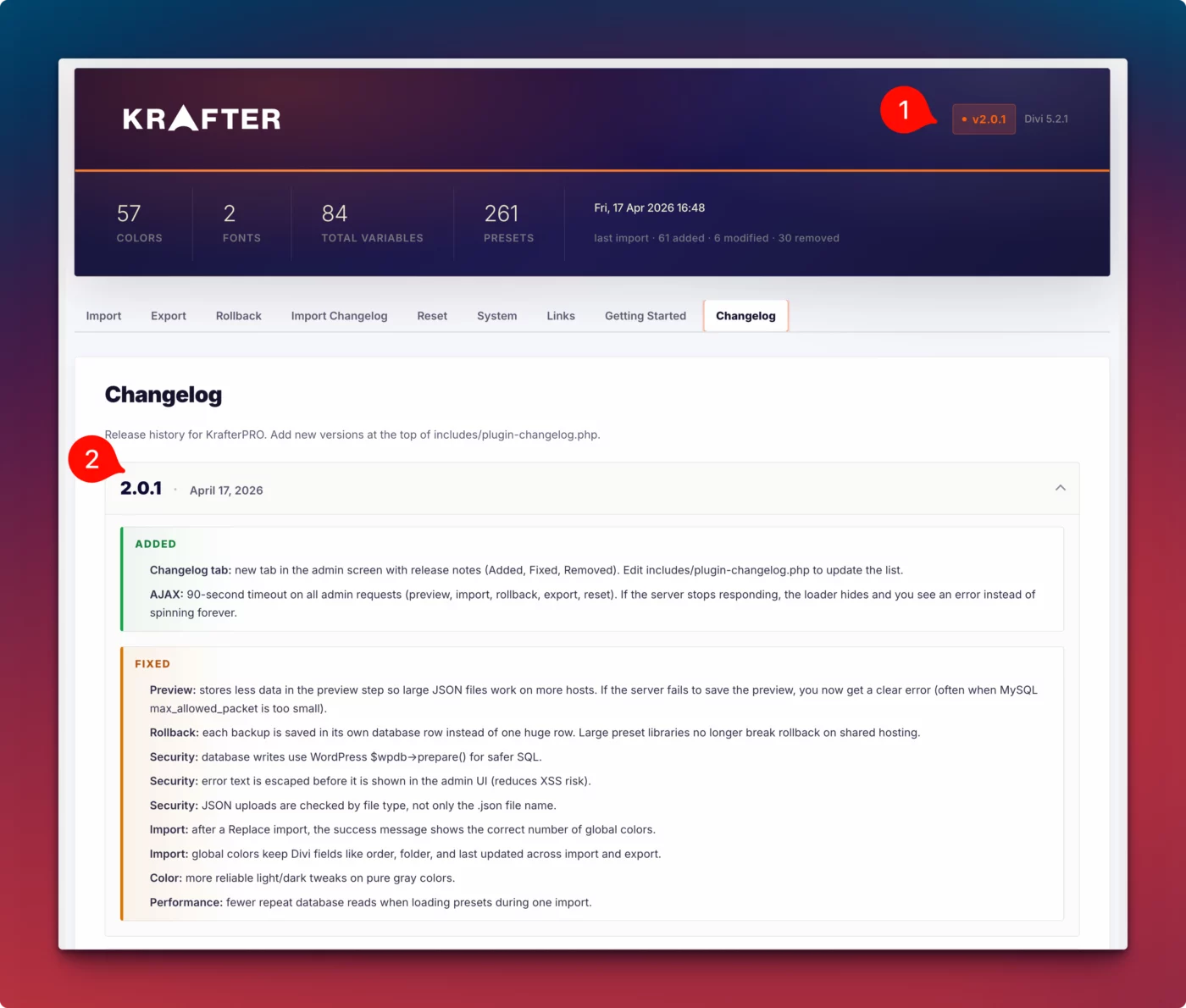
Changelog
ADDED
- Changelog tab: new tab in the admin screen with release notes (Added, Fixed, Removed). Edit includes/plugin-changelog.php to update the list.
- AJAX: 90-second timeout on all admin requests (preview, import, rollback, export, reset). If the server stops responding, the loader hides and you see an error instead of spinning forever.
FIXED
- Preview: stores less data in the preview step so large JSON files work on more hosts. If the server fails to save the preview, you now get a clear error (often when MySQL max_allowed_packet is too small).
- Rollback: each backup is saved in its own database row instead of one huge row. Large preset libraries no longer break rollback on shared hosting.
- Security: database writes use WordPress $wpdb->prepare() for safer SQL.
- Security: error text is escaped before it is shown in the admin UI (reduces XSS risk).
- Security: JSON uploads are checked by file type, not only the .json file name.
- Import: after a Replace import, the success message shows the correct number of global colors.
- Import: global colors keep Divi fields like order, folder, and last updated across import and export.
- Color: more reliable light/dark tweaks on pure gray colors.
- Performance: fewer repeat database reads when loading presets during one import.
- Download latest version here.
- Watch the video here.

Hello Mak
I have written to support but have not received any response. I have been logged out of Divi 5 Mastery ll. I am a life time member, I would be grateful if I could continue the course.
Br
Roland
This is a response to our Divi University member @kendold.
Huge thank you to Frank Schlatter for helping out!
I will be releasing Version 2.0.1 Tomorrow.
If you've ever imported a design system into Divi 5 and watched your global variables disappear — you know the panic.
I've been there.
One bad import. Server times out halfway through. Blank state. Everything gone.
That's exactly why I built this into KrafterPRO 2.0.
I just dropped a sneak peek video showing you what's new — and honestly, this update changes how you manage Divi 5 sites at a fundamental level.
Here's a taste of what's inside:
- Atomic imports — nothing gets written to your DB until everything is verified (no more half-broken imports)
- Rollback history — one click to undo any import instantly
- Full preview before you commit — see every color, font, and spacing token before a single thing changes
Please give me your thoughts and feedback. I will be releasing KrafterPRO 2.0 Tomorrow.