Does anyone have a solution for adding Social Share buttons/links to Posts, that works in DIVI 5?

Hello! Where do lifetime members download the latest Krafter 2.4? Cheers!

Presets are the future of web design — not manual styling, not one-off tweaks, not “designing as you go”.
Divi’s new Preset Manager is a huge step in the right direction. It finally makes it easier to organise, reuse, and manage design decisions at scale.
But it’s not there yet.
In this video, I walk through:
– Why preset-based design will replace manual styling
– What the new Preset Manager does really well
– The critical features it’s still missing (like visibility of imported presets and bulk management)
– Where I think this is heading long-term for Divi and modern design systems
If you care about speed, consistency, and professional-grade design workflows, this feature matters — even in its current state.

In the Preset Manager, element and group presets are sorted alphabetically. This is also the case when assigning element presets in Designer, but not for group presets. These are completely jumbled up in Designer. Resorting only works for both in the Preset Manager, but in Designer, resorting only affects element presets, not group presets.
Is this just me, or is it the same for you too?

Hi;
I am completely new to DIVI and Krafter. In order to make the update, do I need to delete the prior version or just upload the new version and it will overwrite the file?
Thanks in advance.

Hi there,
I purchased SK Pro a week ago through sitekrafter.com and can access it there. I am not able to access the downloads here in my account. How can we correct this?
The version I downloaded is 6.1.6 which is worthless and there is no update available.
@ MAK Any ideas or help?
Greetings Michael

Could you like another design for alerts Colors?
Mark is possible add another design same first screenshot?
I propose 2 other screenshots:
I Bought your Krafter Design System Invoice #1817 and it does not show in My Account at Divi University. Can you fix it
In this video, I walk you through the latest update to Krafter — my Divi 5 design system — and how it now works seamlessly with the brand-new Divi 5 Preset Manager.
Here’s what’s new inside Krafter:
✅ Light color variants for all headings, custom headings, and body text — instantly design dark layouts without restyling anything. — switch to “light” presets and your UI adapts automatically.
✅ Neutral button presets (light + dark) — perfect for consistent CTA styling in any color scheme. But the real upgrade? The new Divi 5 Preset Manager completely changes how you design.
Inside the video, I show you:
👉 how to use Preview Mode to test presets without committing
👉 how to search your presets instantly
👉 how to rearrange and organise presets for a cleaner workflow
👉 how Krafter taps into these new features to build faster than ever Whether you’re building full websites or designing daily client pages, these improvements make your workflow faster, cleaner, and more predictable.
-
Buy the Divi Mastery Course for ONLY $27
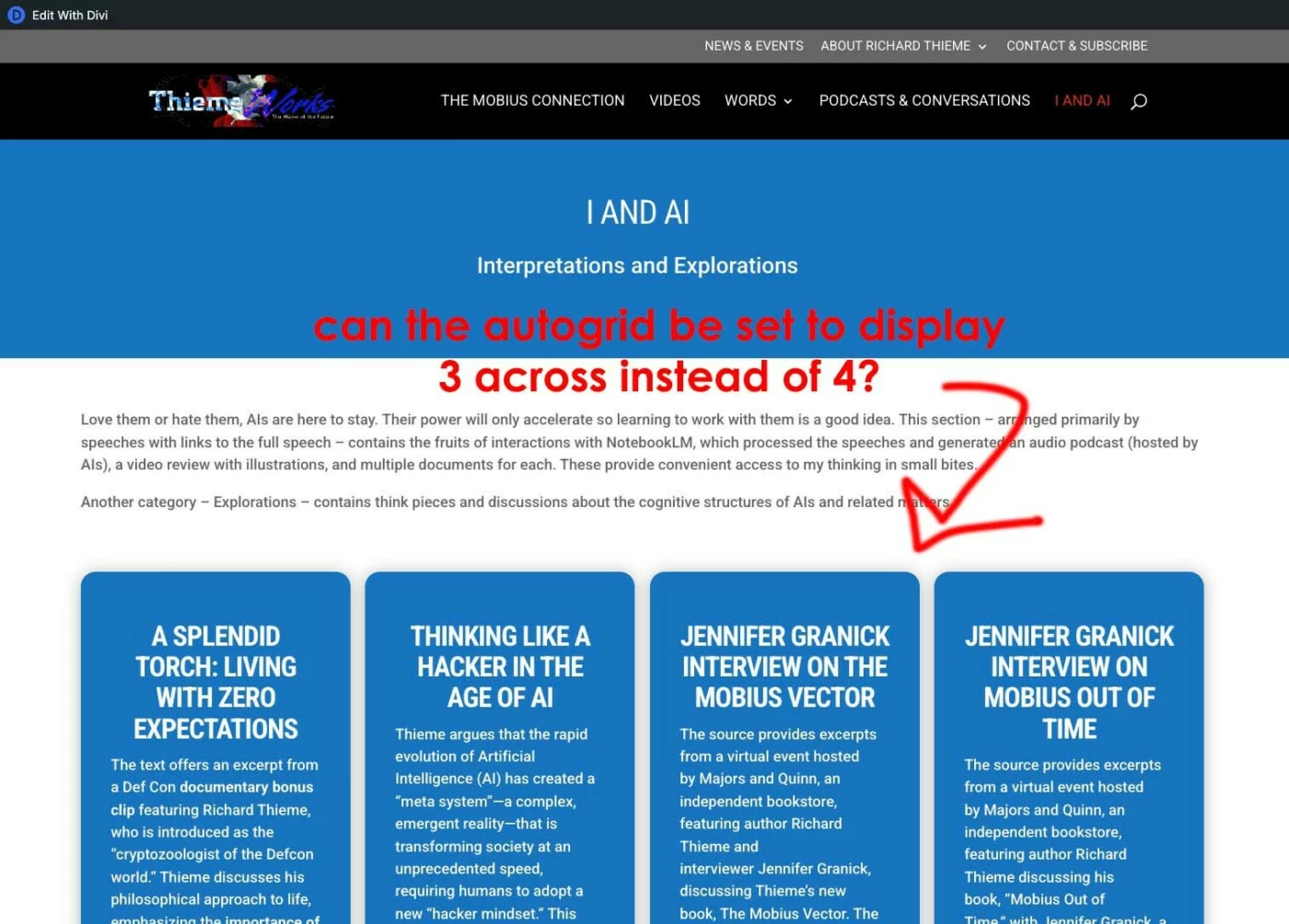
I am using Krafter 2.2 on a DIVI 5 dev site. I have set up one page using Mak's autogrid feature he outlined in a recent video. Is there a way to tell the grid how many items to display in a row?
It currently displays 4 CTA modules in each row. Can this be changed to display 3 in a row? If so, how is that accomplished?